Vibe Coding: What It Is, How It Works, Best Tools and How to Use It to Build and Sell Online
Learn what vibe coding is, how to build your first project with AI using ready-to-use prompts, the best tools, what they cost, the risks and what you can build and sell online.

What will we see in this post

Have you ever imagined building a website, an app or a digital tool just by describing your idea in plain English? With artificial intelligence, that is no longer a distant promise, and it has a name: vibe coding.
The idea is simple: you explain what you want to build, the AI writes the code and, based on the results, you keep refining the project together until you get the version you want.
But can anyone really do it? In this article, we explain what vibe coding is, the main tools, how to build your first project with ready-to-use prompts and how to use this technology to create and sell products online. First, here is a quick summary:
| Question | Answer |
|---|---|
| What is vibe coding? | Building websites, apps and tools by describing what you want in natural language while AI writes the code. |
| Who coined the term? | Andrej Karpathy, cofounder of OpenAI, in February 2025. |
| Do you need to know how to code? | Not to get started, but reviewing and testing the result is still essential. |
| Which tools can you use? | Lovable, Bolt.new, v0, Replit, Cursor, Claude Code and Google AI Studio, among others. |
| How much does it cost? | Most tools have a free plan with usage limits; paid plans start at around $20 a month. |
| What can you build? | Sales pages, membership sites, quizzes, calculators, simulators and other tools for your audience. |
What is vibe coding?
Vibe coding is a way of building software with artificial intelligence in which you describe what you want in natural language and the AI writes the code. Instead of programming every feature by hand, you guide the development through a conversation.
In practice, it works like this: you ask the AI to create a page, test the result and request changes. If a button doesn’t work or some information is missing, you simply explain the problem and ask for a new version.
The term was coined by Andrej Karpathy, cofounder of OpenAI and former director of AI at Tesla, in a post on X on February 2, 2025.
In that post, he described a way of programming in which you give in to the vibes, accept the AI’s suggestions and stop following the generated code in detail. The term caught on so fast that, in November 2025, “vibe coding” was named word of the year by Collins Dictionary.
It helps to separate two uses: in pure vibe coding, you accept the code without reviewing it and judge it only by what you see on screen; when AI is used as a coding assistant, a developer reads, tests and fixes everything it writes. Most serious projects land somewhere in between: the AI writes, and someone checks what matters.
How vibe coding works: step by step from idea to published project
Vibe coding works as a conversation in cycles: you describe the idea, the AI generates a first version, and you test it and ask for changes until the project is ready to publish.
This approach lets you try out solutions without building everything by hand. Someone who wants to test a business idea, for example, can create a prototype over a weekend instead of waiting weeks to start validating the concept.
To understand how to vibe code, let’s follow one example: a cake pricing calculator for home bakers. The idea is to build a tool that takes the cost of ingredients, packaging and labor and suggests a selling price.
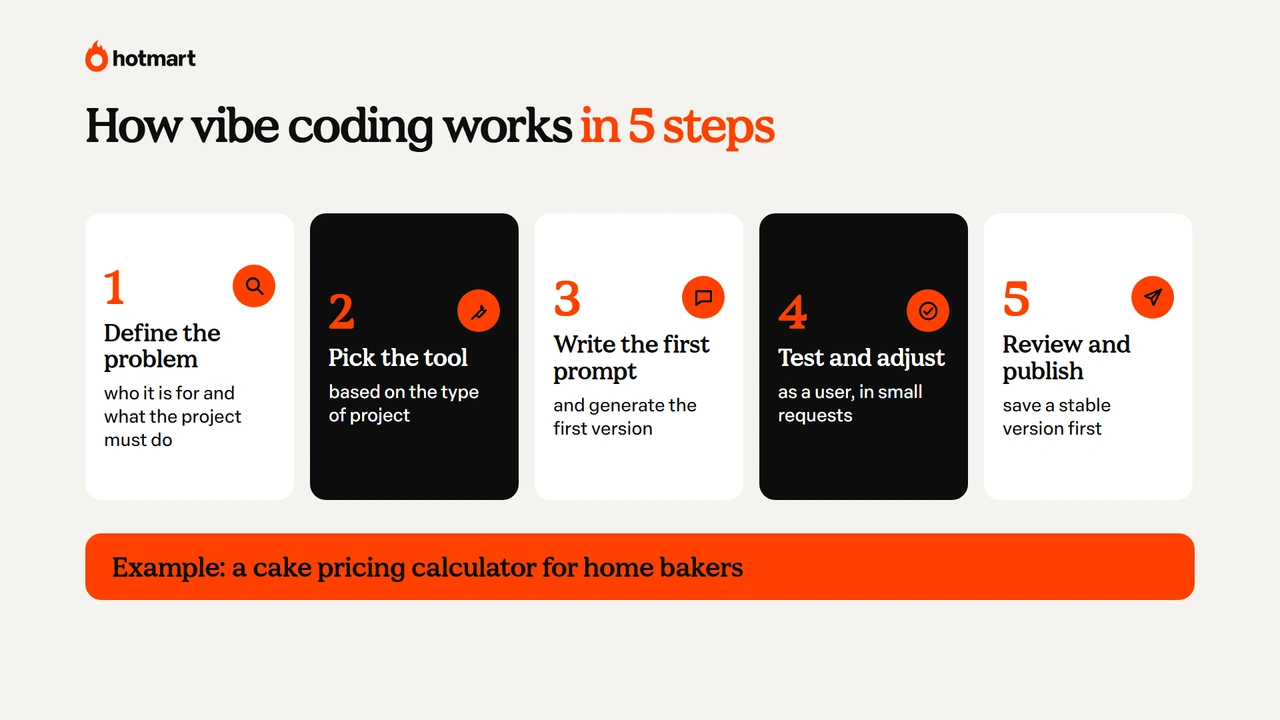
The process can be broken down into five steps:
- Define the problem, the audience and what the project needs to do.
- Choose the right tool for the type of project.
- Write the first prompt and generate the first version.
- Test it as if you were the user and ask for changes in small steps.
- Review, save a version and publish.
1. Define the problem, the audience and what the project needs to do
Before opening an AI tool, get clear on the problem you want to solve. In our example, the audience is home bakers who need to price their cakes without forgetting important expenses.
The calculator should let users enter the cost of ingredients, the packaging cost, the time spent and the desired profit margin. The clearer the goal, the easier it is to guide the AI and judge whether the result meets your audience’s needs.
2. Choose the right tool for the type of project
There are vibe coding tools for different profiles. Some let you create websites and apps right in the browser, with no technical knowledge required. Others run in coding environments and give you more control over the code.
For the cake calculator, a visual tool like Lovable, Bolt.new or Google AI Studio can be a good starting point. What matters most is choosing a solution that lets you test the idea, see the result and make changes easily.
3. Write the first prompt and generate the first version
Now it’s time to turn the idea into an instruction. A good prompt explains the goal, the audience, the features and the look you want.
Prompt to copy and try:
Create a cake pricing calculator for beginner home bakers.
The tool should let users enter the cost of ingredients, the packaging cost, the hours worked, the hourly rate and the desired profit margin.
Calculate the total cost and suggest a selling price based on the margin entered. Also show the estimated profit per cake.
Use a simple interface with soft colors, clearly labeled fields and text in English. The calculator should work on both mobile and desktop.
Before building, briefly explain how the calculation will be done.
The AI will use these instructions to create a first version. At this stage, the goal isn’t a perfect product, but a working base you can test and improve.
4. Test it as if you were the user and ask for changes in small steps
Once the first version is ready, use the calculator as if you were a baker. Fill in the fields, check the results and see whether it’s easy to navigate.
Test unexpected situations too. What happens if someone leaves a field blank? What if they enter a negative number? Does the tool explain the result clearly? If you find a problem, describe exactly what happened. For example:
When I leave the packaging field blank, the calculator shows an error. Change it so a blank field counts as zero, and show a helpful message if a required value is missing. Don’t change the rest of the layout.
Asking for small changes makes it easier to see what was modified and lowers the risk of breaking features that already worked.
5. Review, save a version and publish
Before publishing, check that the calculations are correct, the buttons work and the tool can be used on different devices. It’s also important to save a stable version of the project. That way, if a future change causes problems, you can roll back to what worked.
Publishing, also called deployment (the process of making software available to users), can often be done in the platform itself, depending on the tool. For the calculator, it’s best to start with a simple version, with no mandatory sign-up and no personal data stored.
If the project needs a back end (the part of the system that processes information), a database (where information is stored) or an API (an interface that lets systems talk to each other), it gets more complex and may need a technical review.
Once the first version is live, you can share the tool with a few bakers, hear what they think and spot improvements.
How to write good prompts for vibe coding
To write good prompts for vibe coding, explain what the project does, who it’s for, what features it needs and how it should look. The more specific the request, the better the chances that the AI generates a useful first version.
If you’re still getting familiar with the topic, it helps to understand what a prompt is and how it guides the AI. It’s also worth asking the tool to plan the project before it starts building.
If you have a visual reference, send an image or screenshot to show the style you want. And when something doesn’t work, describe the error instead of just asking the AI to try again.
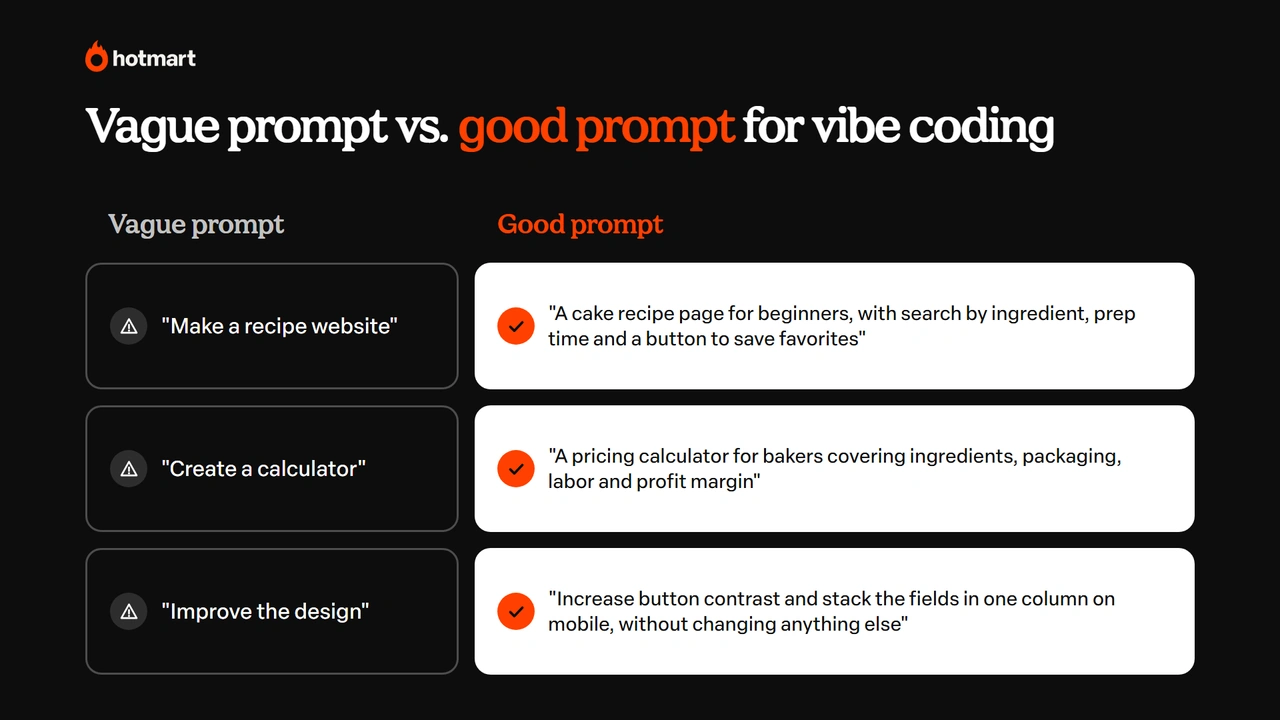
Here’s how to turn vague instructions into more complete prompts:
| Vague prompt | More complete prompt |
|---|---|
| Make a recipe website | Create a cake recipe page for beginners, with search by ingredient, photos, prep time and a button to save favorites. Use shades of pink and text in English. |
| Create a calculator | Create a pricing calculator for bakers that covers ingredients, packaging, labor and profit margin, showing the total cost and the suggested price. |
| Make a study app | Create a Spanish review app with multiple-choice questions, instant feedback and a count of correct answers. |
| Improve the design | Increase the contrast of the buttons, stack the fields in a single column on mobile and highlight the main result. Keep the existing features. |
Another good habit is asking the AI to explain what it changed. You can use a prompt like this:
Before changing the project, explain which files and features will be affected. Make only the requested change and, when you’re done, summarize what changed and how I can test it.
This helps you avoid rework and wasting credits, especially on platforms that charge based on usage.
Vibe coding vs. low-code and no-code: what’s the difference?
The difference between vibe coding, low-code and no-code is that, with vibe coding, you describe the project and the AI writes the code. With no-code and low-code, you usually build with visual interfaces, ready-made components and settings.
With no-code, the goal is to build applications without writing any code by hand. With low-code, the platform reduces the need for programming, but allows or requires code in some situations. Vibe coding uses AI to turn instructions into software, offering a more conversational way to build.
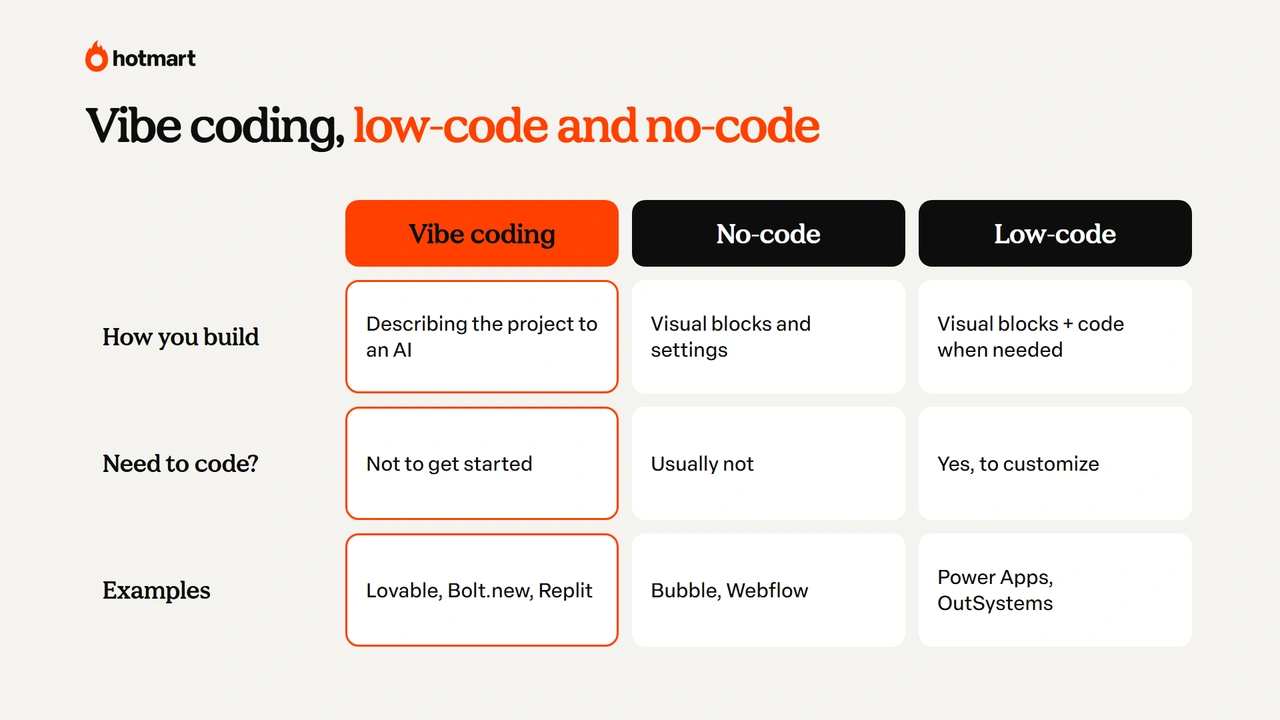
| Criteria | Vibe coding | No-code | Low-code |
|---|---|---|---|
| How you build | By describing the project to an AI | With visual components and settings | With visual components and code when needed |
| Coding knowledge | Not required to get started | Usually not needed | May be needed for customization |
| Flexibility | Depends on the tool and the generated code | Depends on the platform’s features | Can offer more technical customization |
| Examples | Lovable, Bolt.new and Replit Agent | Bubble and Webflow | Microsoft Power Apps and OutSystems |
| Main advantage | Creating and testing ideas through conversation | Building apps with visual tools | Speeding up development while keeping the option to code |
A company might use a no-code tool to organize internal processes and vibe coding to build a custom feature, for example. The right choice depends on the project’s complexity, the features you need and the experience of whoever will maintain it.
Will vibe coding replace programmers?
There’s no evidence that vibe coding will fully replace programmers. The technology is changing software development, but building a reliable system takes more than writing code. Professionals are still needed to design the project’s architecture, review features, protect data and make sure the software works correctly.
According to the Stack Overflow Developer Survey 2025, 84% of respondents were using or planning to use AI tools in development, but 72% said vibe coding isn’t part of their professional work.
In March 2025, Jared Friedman of Y Combinator said that about a quarter of the startups in that year’s winter batch had around 95% of their code generated by AI. These companies, however, were founded by technical people.
Another study, by METR in July 2025, found that experienced developers took 19% longer to complete certain tasks on projects they already knew when they used AI tools. That doesn’t mean AI always lowers productivity: the research looked at a specific group under specific conditions, and METR itself later shared signs that this picture was changing.
Here’s how the two approaches compare:
| Criteria | Vibe coding | Traditional programming |
|---|---|---|
| Who writes the code | Mostly the AI | Mostly the developer |
| Review | May be limited in more casual use | Part of the development process |
| First version | Can be created quickly | Depends on scope and implementation |
| Control and maintenance | Need attention when the code isn’t understood | Offer more direct control over the structure |
| Best suited for | Prototypes, pages and simple tools | Complete, critical systems or specific requirements |
In practice, vibe coding makes software creation more accessible, while technical knowledge remains essential for projects that demand greater reliability.
Best vibe coding tools
The main vibe coding tools include Lovable, Bolt.new, v0, Replit, Google AI Studio, Cursor and Claude Code. Some are designed for people who have never coded, while others offer advanced features for developers.
The best AI for vibe coding depends on what you want to build. For a simple page or app, a tool that runs in the browser may be enough. For a project with many files and features, an AI-powered development environment may be a better fit. To explore options beyond coding, check out our list of artificial intelligence tools.
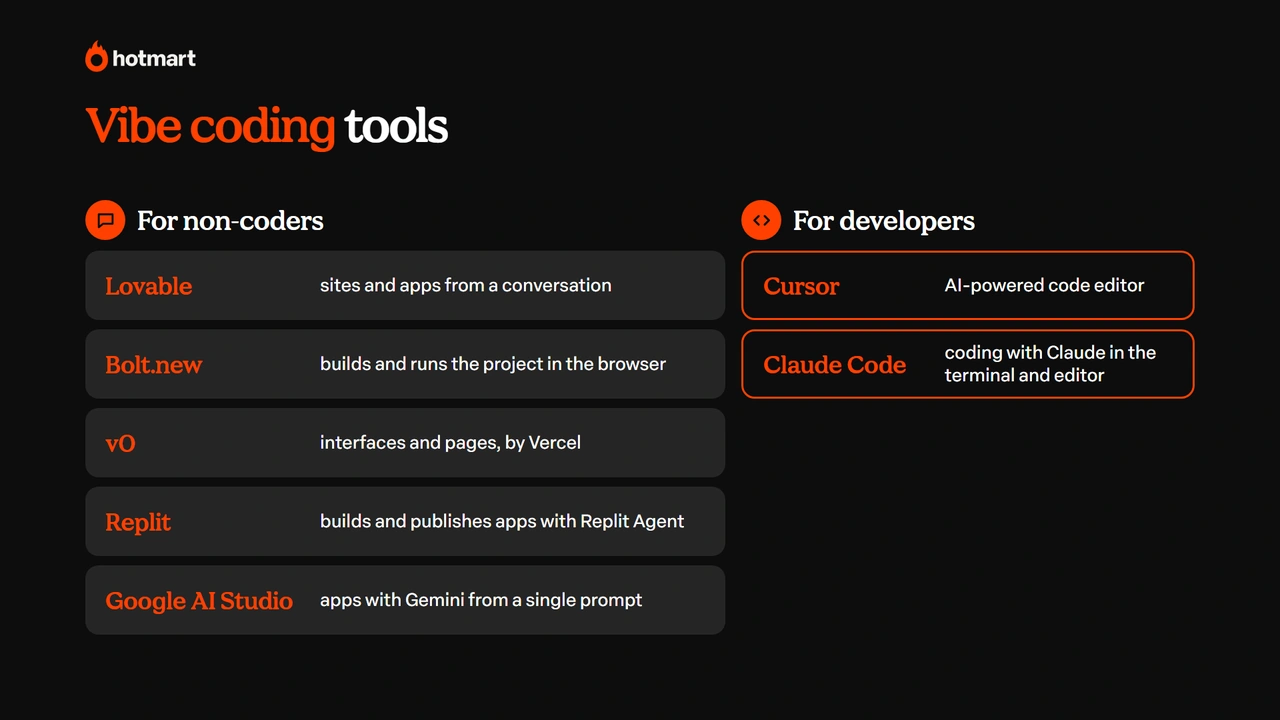
| Tool | Company | Who it’s for | Strength |
|---|---|---|---|
| Lovable | Lovable | Beginners and entrepreneurs | Building websites and apps from a conversation |
| Google AI Studio | People who want to experiment with Gemini apps | Creating prototypes and apps from prompts | |
| Bolt.new | StackBlitz | Beginners and people testing ideas | Generating and running projects right in the browser |
| Claude Code | Anthropic | Developers and technical users | Working with code, files and development tasks through Claude |
Claude Code, for example, is a good fit for people who need to work directly with a project’s structure. And if you’re wondering which assistant to use day to day, see our comparison of Claude vs. ChatGPT. And to connect these assistants to other tools and data, it helps to understand what MCP is.
Rounding out the list are v0, by Vercel, which generates interfaces and pages and publishes them within Vercel’s ecosystem; Replit, which uses Replit Agent to build and publish apps from natural language requests; and Cursor, by Anysphere, an AI code editor built for developers.
How much it costs: most tools offer a free plan with usage limits (5 credits a day on Lovable; 1 million tokens a month on Bolt.new) and paid plans starting at around $20 to $25 a month (Replit Core, $20; Bolt.new Pro, $25), according to their official pricing pages in November 2026. Bigger projects use up credits faster.
Vibe coding limits and risks
The main risks of vibe coding involve security, maintenance and dependence on tools. Because AI can generate code you don’t fully understand, a project that seems to work may have problems that only show up after it goes live.
That doesn’t mean you should avoid the technology. But the more sensitive the application, the more careful you need to be with testing and review.
A Veracode study published in July 2025 evaluated more than 100 AI models and found security flaws in 45% of the code generation tasks analyzed.
Another analysis released in May 2025 found a data exposure flaw in 170 of 1,645 apps built with Lovable. The case showed how poorly configured access settings can put personal information at risk.
| Risk | What can happen |
|---|---|
| Security | An app may expose information or allow unauthorized access. |
| Maintenance | The project works, but no one understands its structure well enough to fix future problems. |
| AI agent errors | An automatic change can modify or delete important information. |
| Platform dependence | The project may be limited to one tool’s features and pricing terms. |
| Unexpected costs | Repeated changes and complex features can burn through credits quickly. |
One case that drew attention happened in July 2025, when Jason Lemkin, founder of SaaStr, reported that a Replit AI agent deleted a project’s database despite instructions not to make certain changes. It’s a reminder to keep backups and review any operation that can affect important data.
When is vibe coding worth it?
Vibe coding is worth it for simple, low-risk projects; the more sensitive data and users a project has, the more it needs professional support:
| Worth trying | Needs professional support |
|---|---|
| Prototypes to test ideas | Financial systems or critical operations |
| Simple calculators and simulators | Apps that store sensitive data |
| Informational pages and personal projects | Platforms with many users and complex rules |
| Educational tools with no personal data | Systems with login, payments or sensitive integrations |
The key is matching the level of review to the project’s risk. A calculator that stores no data needs different care than an app that takes payments and keeps customer information.
Best practices for safe vibe coding
To vibe code safely, treat AI-generated code as a first draft that needs to be tested, reviewed and secured before it goes live.
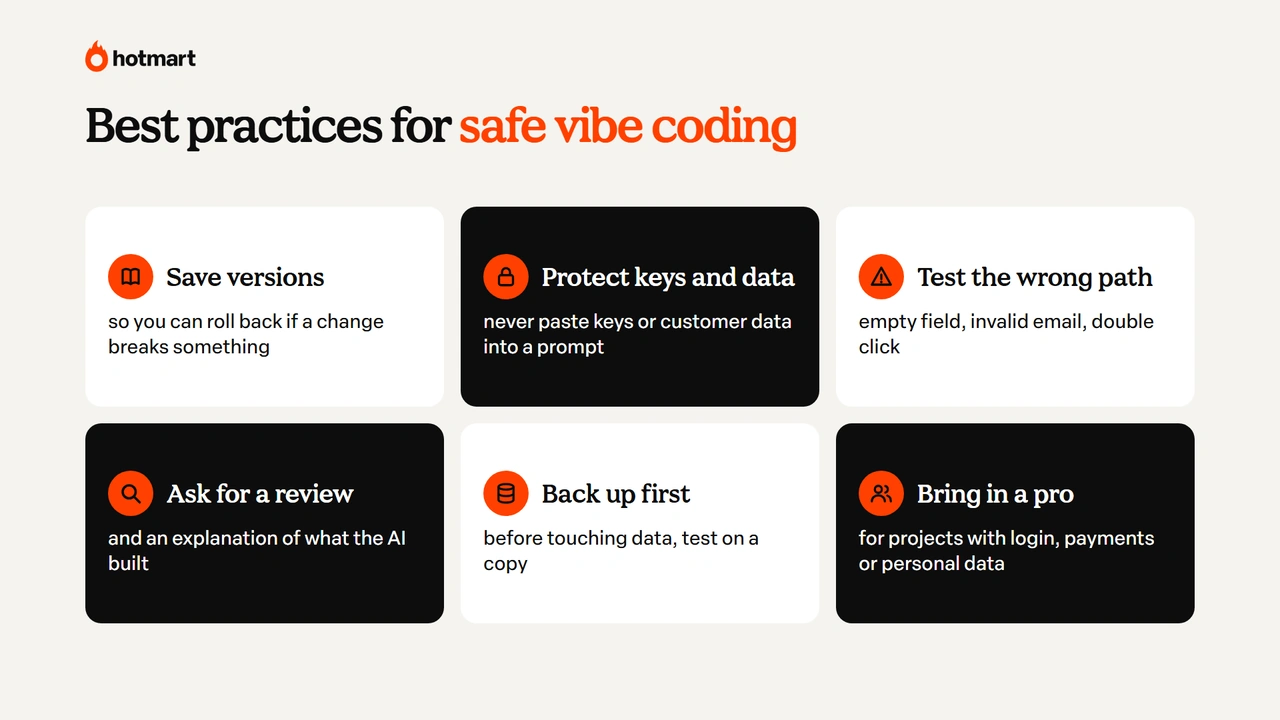
A few habits help reduce errors and make maintenance easier:
- Save versions of the project. Use the tool’s history or a GitHub repository so you can roll back if a change causes problems.
- Protect passwords and personal data. Never paste credentials, access keys or customer information into prompts. Use the platform’s secure secrets storage instead.
- Test unexpected situations. Besides checking that the tool works normally, try blank fields, invalid emails and repeated button clicks.
- Ask for a security review. Have the AI look for possible flaws and explain how the project works. This helps, but it doesn’t replace an independent technical review.
- Back up before major changes. If the app uses a database, test changes on a copy before touching the environment your customers use.
- Bring in a professional when needed. Projects with login, payments or personal data need special attention to security and to data protection laws such as GDPR.
These habits apply to any vibe coding tool and can prevent problems that would be much harder to fix after launch.
Vibe coding for online sellers: what you can build
For people who sell courses, ebooks, coaching programs or events, vibe coding makes it possible to build digital tools and experiences that used to require hiring a developer or an agency.
That opens up new ways to create more interactive content, offer bonus materials and test new product ideas. Common uses include:
- Quizzes, calculators and simulators to attract potential customers.
- Pages to present products and promote events.
- Membership areas and bonus course materials.
- Apps to run coaching programs and track student progress.
Here’s how to put these ideas into practice.
1. Quizzes, calculators and simulators to attract customers
Interactive tools help turn content into a hands-on experience for your audience. They can work as a lead magnet, meaning free resources that attract people interested in a topic.
A baker who sells courses, for example, could offer a cake pricing calculator. The tool helps people solve a common question and gives them a taste of what the course teaches.
Prompt to try:
Create a cake pricing calculator for beginner home bakers.
Users should enter the cost of ingredients, packaging and labor, plus their desired profit margin.
Show the total cost, the suggested price and the estimated profit. Explain the calculations simply and use a mobile-friendly interface.
Don’t require sign-up or store any personal information.
The same approach works in other niches, such as a quote calculator for freelancers or a placement quiz for language learners.
2. Pages for your product and events
Vibe coding can also be used to create product pages, sign-up pages and event pages, such as a lead capture landing page.
Picture a language teacher who wants to promote a free class. They could create a page with details about the session, the schedule, an introduction to the teacher and a sign-up button.
Prompt to try:
Create a promotional page for a free Spanish class for beginners.
Include a title, class description, date, time, teacher bio and a sign-up button.
Use a modern look, text in English and a mobile-friendly layout. Leave space to add the official sign-up link.
Before publishing, review the copy, check that the links work and make sure the event details are correct.
3. Membership areas and bonus materials
People who sell online courses can use vibe coding to build materials that enhance the learning experience.
A personal finance teacher, for example, could create a monthly budget simulator so students can practice what they learn in class. You can also build interactive exercises, quizzes and review tools.
Prompt to try:
Create an educational monthly budget simulator for students in a personal finance course.
Users should enter income and expenses by category. Show the monthly balance and a simple chart of how spending is distributed.
Include educational explanations and make it clear the results are only simulations. Don’t store any personal or financial data.
Resources like these make learning more practical and help students apply what they learn. If you want a full membership site with login and stored data, you’ll need to plan for additional security and privacy requirements.
4. Apps for coaching programs and student tracking
Vibe coding can help you build simple apps to organize activities and track student progress.
Picture a fitness coach who runs a healthy habits program. She could build a tool where participants check off completed activities and follow their progress.
Prompt to try:
Create a simple habit tracking app for participants in a coaching program.
Include a list of daily activities, a way to check off completed tasks and a weekly progress summary.
Use a friendly interface with motivating language and easy mobile navigation.
In this first version, don’t include login, health information or storage of personal data.
The app can start as a prototype and grow with your students’ needs. Keep in mind that AI helps build the tool, but the strategy is still up to the creator.
Before publishing, review the information, test the experience and never use made-up testimonials or results. After all, it’s your audience’s trust that turns interest into sales.
From prompt to sale: how to publish and sell with Hotmart Launchpad
To publish and sell a project built with vibe coding, you need to handle hosting, a domain, access and payments, not just build the tool. Creating an app is only part of the process; turning the idea into a product depends on that second step.
For online sellers, one option is Hotmart Launchpad, which entered open beta at Hotmart FIRE 2026 in September. With Launchpad, you can describe an idea and use AI to build websites, sales pages, membership areas, web apps and interactive tools such as quizzes, simulators and calculators.
The idea is to bring building and selling into the same place. According to the tool’s documentation, some examples of what you can build with vibe coding in Launchpad are:
- A question bank and practice tests for someone selling an exam prep course, with performance tracking.
- A diagnostic quiz that shows a student’s level before they buy a language course.
- A niche planner or generator, such as a weekly workout planner or a meal plan generator for someone selling recipes.
- An ebook page that delivers the PDF, a coaching app with session scheduling and an event page that sells tickets.
Launchpad doesn’t publish native apps to the App Store or Google Play: projects run on the web. The process has three steps:
- Describe your idea: explain what you want to build and what features it needs.
- Refine it by chatting with the AI: follow the build and ask for changes to the design, copy and features.
- Publish: take the project live with Hotmart’s hosting, domain and built-in checkout.
The agent also takes your brand identity into account, such as your logo, colors and tone of voice, and asks for your input on important decisions. The project’s code stays accessible so you can review and edit it.
The built-in checkout offers more than 40 payment methods and 22 currencies, according to the product’s official page. The free plan includes 15 credits a month and one published app, and paid plans start at $20 a month (November 2026 pricing, per the official documentation).
That means a pricing calculator like the one we built throughout this article can go from prototype to a published digital experience. If you have an idea and want to start testing it, check out Hotmart Launchpad.
Ready to bring your idea to life?
Now that you know what vibe coding is, it’s easier to see why this technology is changing the way digital products are made.
With AI, you can turn an idea into software through a conversation, testing the results and making changes until you reach the version you want.
But being able to build quickly doesn’t remove the need to review. Good prompts, testing and attention to security make the difference between an interesting prototype and a reliable tool. The good news is that there are options for every experience level, including free tools for beginners.
And for online sellers, the possibilities go beyond building an app. Quizzes, simulators, pages and interactive materials can help you offer richer experiences and test new business opportunities.
Your first step doesn’t have to be a complex project. It can be a calculator, a page or a small tool that solves a real problem for your audience.
Vibe coding FAQ
Still have questions? Below, we answer the most common questions about vibe coding.
What does vibe coding mean?
Vibe coding means building software by talking to an AI in natural language and letting it write the code. The name comes from the idea of following the "vibe" of the conversation instead of writing every line of code by hand.
Do you need to know how to code to vibe code?
No. Some vibe coding tools let you create websites, apps and prototypes using only natural language instructions. That said, coding knowledge helps you spot errors, review security and maintain more complex projects.
How do you learn vibe coding from scratch?
Start with a browser-based tool like Lovable or Bolt.new. Then build a simple project, write clear prompts, test the results and make changes in small steps. You can also take a vibe coding course to learn more about logic, security and app development.
What is the best AI for vibe coding?
It depends on the project and your experience level. Lovable, Bolt.new, Replit and Google AI Studio are good options for building apps and prototypes with less technical setup. Cursor and Claude Code are better suited to developers who need to work directly with the code.
Is vibe coder a job?
The term vibe coder describes people who build software with the help of AI, but it isn’t yet a regulated profession or a standard job title. Some job listings mention experience with vibe coding tools, but they usually also require knowledge of development, testing, integration and security.