
Claude vs ChatGPT: which is better, key differences and how to use each one in your digital business
Compare Claude and ChatGPT on writing, documents, coding, images and pricing, see when to use each AI and how to apply them to create and sell digital products.

What will we see in this post

You’ve probably asked yourself: Claude or ChatGPT? Which artificial intelligence is more worth using day to day?
For people who work with content, marketing or digital businesses, this question goes beyond picking a tool. After all, both can help you write, research topics, analyze information and automate tasks.
But there are important differences between them. In this article, we compare Claude vs ChatGPT, go over their features and pricing and show when it makes sense to choose each one. You’ll also learn how to use these tools to create and sell online courses, e-books and other digital products.
Claude or ChatGPT: which is better?
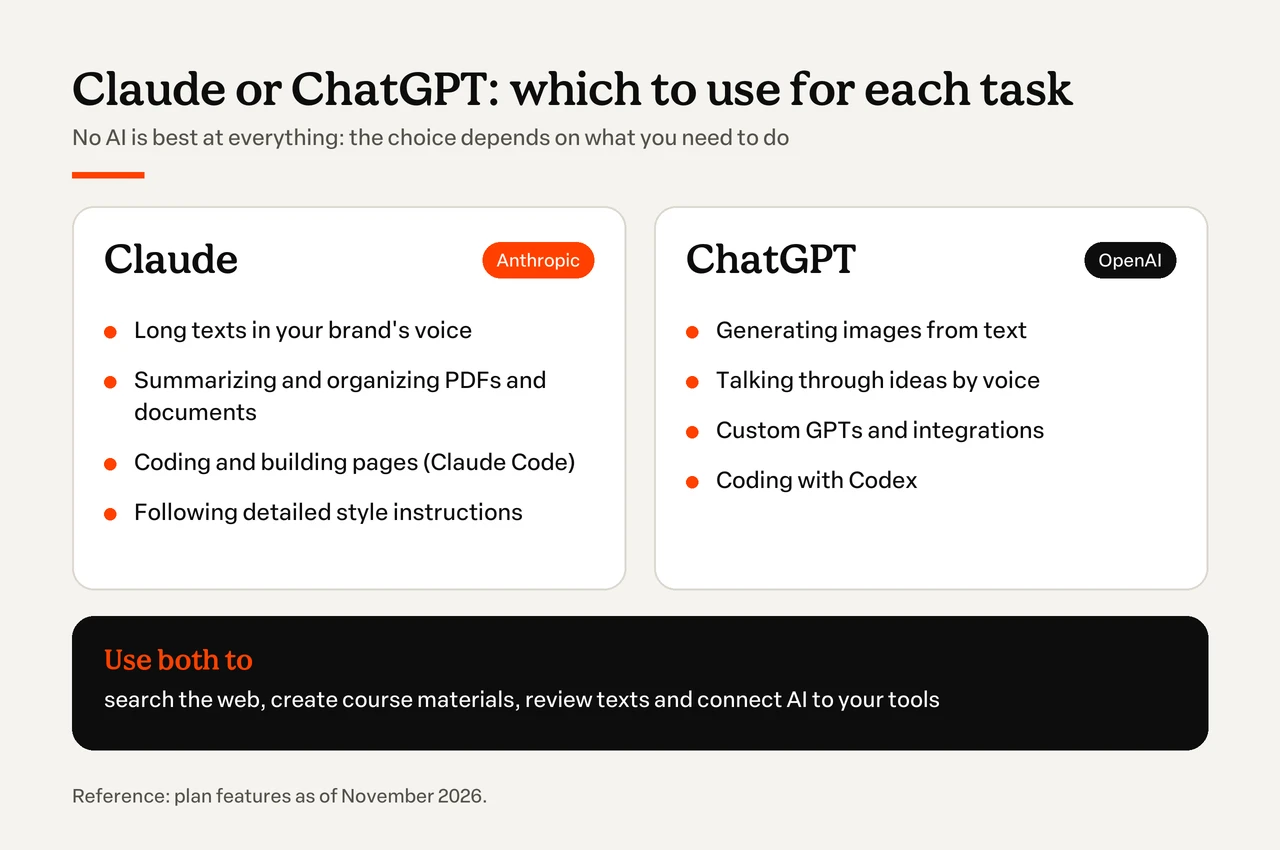
Short answer: Claude is usually the best choice for long-form writing, document analysis and coding, with Claude Code. ChatGPT is more complete in multimedia features, such as image generation and voice conversations, and has the largest ecosystem of GPTs and integrations. For most people, the decision depends on the task, and many use both.
There is no artificial intelligence that is best at every task. When comparing Claude and ChatGPT, the choice mainly depends on the type of work you want to do.
Claude tends to stand out in tasks that involve writing, organizing long documents and coding. ChatGPT offers a very versatile experience, with image generation, voice conversations, web search and different tools to carry out tasks.
That doesn’t mean one AI can’t do what the other does. Both have similar features in many areas, and the quality of the answers also depends on the model, the instructions and how complex the request is.
To make the choice easier, here’s when each tool may be the better fit:
| What do you need to do? | Which AI to consider? | Why |
|---|---|---|
| Write a long piece in your brand’s tone of voice | Claude | Follows detailed style instructions in long texts |
| Summarize and organize a long PDF | Claude | Works well with large documents and Projects |
| Create images for posts and campaigns | ChatGPT | Generates images from text descriptions |
| Talk through ideas by voice | ChatGPT | Has the most complete voice mode |
| Code or build a web page | Claude (Claude Code) or ChatGPT (Codex) | Both have specialized coding agents |
| Search for up-to-date information on the web | Both | Both have web search and deep research |
| Create and review online course materials | Both | Claude for long texts, ChatGPT for images and exercises |
| Connect the AI to the tools you already use | Both | Depends on the integrations available in your plan |
In practice, many professionals can benefit from using both tools. For example, you can research a topic in ChatGPT, develop a long piece in Claude and go back to ChatGPT to create images that complement the content.
Before deciding, it’s worth understanding what each platform offers.
What is Claude?
Claude is an artificial intelligence assistant developed by Anthropic, an American company founded in 2021 by siblings Dario and Daniela Amodei, both former OpenAI employees. The tool uses language models to understand instructions, answer questions, write texts, analyze documents and help with coding.
One of its main strengths is the ability to work with long information and detailed instructions. That’s why it can be useful for professionals who need to organize research, review documents, write long-form content or structure complex projects.
Claude has different model families for specific needs:
- Opus: the most advanced models in the family, designed for complex tasks that require stronger reasoning.
- Sonnet: models that balance performance, speed and cost.
- Haiku: faster and more affordable models, suited to simpler tasks or frequent responses.
As of November 2026, the models available in Claude are Fable 5.1, the most advanced one, with limited access on paid plans, Opus 5.5, Sonnet 5.5 and Haiku 5.5. The free plan uses Sonnet and Haiku.
You can use the assistant in the browser, in mobile and desktop apps and through specific tools, such as the Chrome extension and Claude Code.
Claude Code is mainly designed for programming and lets you work with code, projects and development tasks.
What is ChatGPT?
ChatGPT is an artificial intelligence assistant developed by OpenAI, the company led by Sam Altman, launched on November 30, 2022. The tool helped popularize generative AI by letting anyone interact with language models through a conversation. In February 2026, OpenAI reported that ChatGPT had 900 million weekly users.
Besides answering questions and writing texts, ChatGPT offers features to analyze files, generate images, search the web, talk by voice and help carry out tasks.
As of November 2026, ChatGPT uses models from the GPT-6 family. The free plan and Go get lighter versions, while Plus and Pro unlock the advanced reasoning models.
Its features include custom GPTs, which let you set up assistants for specific needs, and deep research and agent features, which can handle more complex tasks with different tools.
For content creators, this means you can bring several steps of the process into one platform: research a topic, outline a script, review your writing and produce visuals.
If you want to understand how the tool works in more detail, check out our guide on what ChatGPT is and how to use it.
Main differences between Claude and ChatGPT
The main difference between Claude and ChatGPT lies in the experience each platform offers and in how their features fit different tasks.
Although both tools can write, analyze information and write code, they differ in content production, working with documents, multimedia features and integrations.
Here are the main points of comparison:
- Writing and tone of voice: ability to write and follow style guidelines.
- Long documents and memory: analysis of long files and continuity of context.
- Coding: tools specialized in software development.
- Images, voice and video: features for working with different content formats.
- Search and agents: finding information and carrying out tasks with more autonomy.
- Integrations: connection with apps and work platforms.
- Privacy: settings for data use, storage and protection.
Below, we go through each of these points in detail.
Writing and tone of voice
Both Claude and ChatGPT can write articles, emails, scripts, product descriptions and other written materials. The difference usually shows in how each model interprets style instructions and organizes information.
Claude is a strong option for developing long texts, reviewing structure and working with detailed guidelines. ChatGPT can also follow style guides and help you try out different creative approaches.
Imagine you need to write a welcome email for students of an online course. Instead of just asking for a text, you can write a more complete prompt, with examples of previous messages, your brand’s tone and the information that needs to be included.
In this kind of task, the best tool is the one that reproduces your intent most accurately, without losing a natural feel.
Long documents and conversation memory
Claude and ChatGPT both let you work with long documents, such as PDFs, spreadsheets, reports and research materials.
An important feature for this kind of work is the context window. Simply put, it’s the amount of information the model can take into account when performing a task.
To organize recurring documents and conversations, both have Projects, which keep files and instructions in one place, and memory, which remembers your preferences across conversations. In Claude, Projects and memory are already available on the free plan, with a limit of 5 Projects.
For important documents, ask the AI to show where each piece of information came from and check the original passages before using the results.
Coding and building pages
When it comes to Claude vs ChatGPT for coding, both platforms offer features to write, explain, review and fix code.
Claude offers Claude Code, a tool specialized in development. OpenAI offers Codex, designed for programming and for carrying out tasks in software projects.
These tools can help you build pages, apps, automations and prototypes from natural language instructions. AI can help create the initial structure, but you’ll still need to test the page, check its security, make sure it works on different devices and connect the systems you use correctly. If you’d rather not code at all, there are also tools to create a landing page without programming.
For more complex projects, a professional developer is still important.
Images, voice and video
Multimedia features are a relevant difference between Claude and ChatGPT.
ChatGPT offers image generation from text descriptions, as well as voice features that let you talk to the AI more naturally.
Claude doesn’t generate photos or illustrations from text the way ChatGPT does. It analyzes images you upload, has a voice mode and, with Claude Design, launched in April 2026, creates prototypes, slides and visual pieces with layout and text.
For video, it’s worth checking which features each plan includes, since they change often.
Web search and agents
Both tools can search the internet and help organize the results.
Beyond quick searches, Claude and ChatGPT offer deep research features that gather information from different sources and produce structured analyses. Both can also act as agents that carry out tasks with more autonomy.
But keep in mind: researching with AI doesn’t remove the need to check your sources. Market data, prices, statistics and recent information should be verified before they appear in sales materials.
Integrations and ecosystem
Claude and ChatGPT can connect to tools you use every day at work, such as storage services, productivity apps and communication platforms.
ChatGPT has custom GPTs and an ecosystem of apps and integrations that lets you adapt workflows to different needs.
Claude offers connectors, projects and skills, which help organize recurring instructions and tasks. Depending on the plan, you can also use tools connected to your browser and work environment. Before choosing a platform, check which services you actually use and whether the integration you need is available on your plan.
Privacy and data use
Privacy deserves special attention when you use AI to work with customer information, business strategies or internal documents.
Both Anthropic and OpenAI offer settings related to how conversations and files are used to improve their models. The terms vary depending on the account type and plan.
In ChatGPT, users on personal plans can go to Settings > Data controls and turn off the option to use new conversations for training. Business plans have specific data handling policies.
Claude also offers controls to limit the use of data for training, as well as specific terms for business accounts.
Before sharing confidential information, review each service’s privacy policies and permissions.
A good practice is to remove unnecessary personal data from documents and spreadsheets. If you want to analyze a course’s sales performance, for example, you can work with aggregated data, without sharing students’ names, emails or payment details.
Claude Pro vs ChatGPT Plus: pricing and plans
Claude and ChatGPT both have free versions, individual subscriptions and business options. The main differences between plans are the usage limits, access to more advanced models and availability of extra features.
If you only use AI occasionally, the free plans may be enough. Professionals who work daily with large volumes of content, code or document analysis may benefit from a paid subscription.
Here’s a comparison of reference prices in US dollars, based on the official pages checked in November 2026:
| Category | Claude | ChatGPT |
|---|---|---|
| Free | Free: $0 | Free: $0 |
| Entry plan | None | Go: $8/month |
| Individual plan | Pro: $20/month or $17/month billed annually ($200 upfront) | Plus: $20/month |
| Advanced plans | Max: $100/month (5x Pro usage). Ultra: $200/month (10x Pro usage, no 5-hour limit) | Pro: $100, $200 or $500/month, depending on usage tier |
| Business | Team: from $20 per user/month. Enterprise: contact sales | Business and Enterprise |
Sources: Claude plans and ChatGPT plans. Reference prices in US dollars, subject to change, taxes and regional conditions.
With Claude Pro, the annual plan works out to about $17 per month, but requires paying $200 upfront. On ChatGPT, Go is the cheapest of the paid plans, and Pro comes in three price tiers, depending on usage.
The more advanced plans are designed for users who need more usage capacity and additional features.
Claude vs ChatGPT vs Gemini: where Google fits in
In the Claude vs ChatGPT vs Gemini comparison, Google’s assistant is a third option, especially interesting for people who use Google’s services a lot.
Gemini is Google’s artificial intelligence, developed by Google DeepMind, and it integrates with different products in its ecosystem, including Google Workspace, Android and services like Gmail and Drive, depending on the plan and availability.
While Claude can be a good choice for long texts and coding, and ChatGPT offers a versatile experience across content formats, Gemini can make things easier for people who already run their routine on Google tools.
| Comparison | Claude | ChatGPT | Gemini |
|---|---|---|---|
| Company | Anthropic | OpenAI | |
| Strength | Long texts, documents and coding | Multimedia versatility (images and voice) | Integration with Gmail, Drive and Android |
| Coding tool | Claude Code | Codex | Gemini Code Assist |
As with the other comparisons, the best choice depends on the task and the integrations available. If you want to explore other options, see our list of artificial intelligence tools.
Can you use Claude and ChatGPT together?
Yes. You can use Claude and ChatGPT side by side, taking advantage of each tool’s features at different stages of the same project.
Imagine you’re writing an e-book about personal finance. A possible workflow would be:
- ChatGPT: research your audience’s common questions and organize the main topics to cover.
- Claude: develop the chapter structure, work on the long text and review the consistency of the language.
- ChatGPT: create illustrations and explore visual ideas for the cover and promotional materials.
- Claude or ChatGPT: do a final review, checking clarity, repetition and possible gaps in the content.
This process doesn’t have to follow the same order every time. You can use both tools to compare versions of a text or pick just one to do all the work.
What matters most is building a workflow that saves time without compromising the quality of the material.
Claude or ChatGPT: which to use to create and sell digital products
For people who sell online courses, e-books or mentoring, the question is no longer just “Claude or ChatGPT: which is better?” but “which tool can help me at each stage of my business?”.
AI can support different activities, from initial research to content production and results analysis.
Here are six ways to put these tools to work:
- Validate the idea and understand your audience.
- Structure the course, e-book or mentoring program.
- Write the sales page and emails.
- Create content and scripts for social media.
- Produce the launch creatives.
- Support students and analyze results.
Below, you’ll see how to apply each one, with a ready-to-use prompt you can copy and adapt.
1. To validate the idea and research your audience
ChatGPT can help you organize research, identify recurring questions and compare the information available about a market. Claude can also be used to analyze interviews, documents and research materials.
Imagine you want to launch a baking course for beginners. Instead of jumping straight into recording lessons, you can use AI to organize hypotheses about your target audience‘s challenges.
Prompt to copy and adapt:
I want to create an online baking course for people who want to start selling cakes from home. Help me identify five possible challenges this audience faces, which questions I should ask in interviews with potential students and how to validate whether there is interest in the course. Separate hypotheses from proven information and don’t make up market data.
The result can be a starting point for conversations with potential customers, polls and surveys.
2. To structure the course, ebook or mentoring program
Once you’ve validated the idea, it’s time to organize the knowledge that will become your product.
Claude can be a good option for working with long materials, structuring chapters and keeping different parts of the content consistent. ChatGPT can also help create lesson plans, exercises and practical activities.
Imagine you’re developing a personal finance e-book for young adults. To go deeper into this step, see also how to create an ebook.
Prompt to copy and adapt:
Act as an instructional designer. I want to develop an e-book about personal finance for young adults who are starting to manage their own money. Create a table of contents with six chapters, learning objectives and a practical exercise at the end of each chapter. Use accessible language, avoid individual financial advice and point out which information needs to be verified.
From that structure, you can develop the chapters, add examples from your own experience and adapt the content to your audience’s level of knowledge.
The goal is to use AI to organize the learning, not to replace your knowledge of the subject.
3. To write the sales page and emails
A sales page needs to explain what the product offers, who it was made for and what benefits the student can expect.
Claude can help you develop long texts and keep a consistent tone of voice. ChatGPT can be used to explore different headlines, calls to action and messaging approaches.
Imagine you’re preparing to launch a mentoring program on organizing digital businesses.
Prompt to copy and adapt:
Act as a copywriter specialized in digital products. I’m going to launch a mentoring program on organization for small business owners. Based on the information I’ll give you about the audience, methodology, benefits and commercial terms, create a sales page structure with a headline, problem statement, explanation of the solution, benefits and call to action. Don’t make up results, testimonials, bonuses or guarantees. Use a friendly, clear and confident tone.
Then you can ask for headline variations and test which one best communicates the main benefit of the offer.
It’s also worth using AI to create an email sequence that introduces the product, answers the most common questions and helps potential customers make an informed decision, as part of your email marketing strategy.
4. To create content and scripts for social media
ChatGPT can be useful to explore format ideas, write short scripts and plan an editorial calendar. Claude can also help turn long materials into shorter pieces while keeping the message consistent.
Imagine you have a photography course for beginners and want to create content for Instagram, TikTok and YouTube.
Prompt to copy and adapt:
I’m the creator of an online photography course for beginners. I want to produce content for Instagram, TikTok and YouTube that helps people take better photos with their phones. Suggest five short video ideas, with different hooks, practical development and natural calls to action. Prioritize real beginner questions, avoid exaggerated promises and don’t turn every piece of content into an ad for the course.
With the ideas in hand, pick the ones that make sense for your audience and adapt the scripts to the way you speak.
5. To produce the launch creatives
When promoting a digital product, the visuals need to work together with the message.
ChatGPT can help generate images and explore concepts for ad creatives. Claude, in turn, can be used to organize the creative brief, write copy and review the consistency of the campaign.
Imagine you’re launching a gardening course for people who live in apartments.
Prompt to copy and adapt:
I’m going to launch an online course on how to grow plants in small apartments. Create three creative concepts for a social media campaign. For each concept, include a short headline, the visual idea, the main message and a call to action. The tone should be warm and practical. Avoid promising results that depend on individual conditions, such as lighting and plant care.
After choosing a concept, you can use an image generation tool to develop visual references and guide the production of the pieces.
6. To support students and analyze results
The work doesn’t end when someone buys your course or e-book. Support and results analysis are also part of the experience you offer.
Claude and ChatGPT can help you organize FAQs, structure support replies and analyze performance data.
Imagine you’ve received comments and reviews from students of a digital marketing course.
Prompt to copy and adapt:
I’m going to share anonymized comments from students of an online digital marketing course. Organize the main questions, identify recurring themes and suggest improvements to the content and learning experience. Distinguish one-off complaints from frequent problems. Don’t make up information and include examples taken from the comments provided, without identifying the students.
With this analysis, you can spot lessons that need extra explanation, questions that deserve a more complete answer and opportunities to improve the student journey.
If you sell on Hotmart, you can go further and connect Claude or ChatGPT directly to your account with Hotmart MCP. The integration uses the Model Context Protocol, a standard that lets AI assistants access data from other platforms, and it works in Claude Desktop and ChatGPT Desktop. MCP was created by Anthropic itself in November 2024 and is now also supported by OpenAI, which is why the same integration works in both assistants.
With it, you can ask things in plain language, like “how much did I make this week?” or “how many new students joined my course this month?”, and get the answer with your account data in real time. The assistant can also take actions, such as creating a coupon or changing a subscription, but it always shows what it will do and asks for your confirmation first.
The connection uses a personal credential, created on Hotmart, that respects your profile’s permissions and can be revoked at any time. According to Hotmart, your account data isn’t sent to or stored in an external database. The setup steps are in the Hotmart Help Center.
But keep in mind: AI speeds up tasks, but it doesn’t replace the responsibility of the person who creates and sells the product.
Before publishing any material, check the information, numbers and references. Never use made-up testimonials or fictional student results to promote an offer.
Above all, protect your knowledge and your tone of voice. AI can help you organize and communicate your ideas, but it’s your experience that gives the product credibility and builds trust with your audience.
How to turn what AI creates into a product for sale
Choosing between Claude and ChatGPT is only part of the process. Once you’ve organized the content of your course, e-book or mentoring program, you need a structure to present the offer, receive payments and deliver the product to your customers.
That’s where tools for creating and selling digital products come in.
At Hotmart FIRE 2026, Hotmart introduced Launchpad, a solution that lets you build pages, apps and other projects from natural language prompts. You describe the idea, refine the result by chatting with the AI and publish with one click, with a domain and checkout already working. You can create sales pages, members areas, e-book pages with PDF delivery and even mentoring apps with scheduling, and there’s a free plan to test and publish your first project.
The goal is to make it easier to turn ideas into digital experiences, integrated with Hotmart’s checkout, which offers more than 40 payment methods in 22 currencies. Besides Launchpad, the platform has solutions to host courses in a members area, process payments and support product promotion.
This way, you can focus on what really matters: building a relevant product and offering a great experience to your students.
Claude or ChatGPT: how to choose your AI
After comparing Claude vs ChatGPT, one thing is clear: no tool is the best in every situation.
Claude can be especially useful for long texts, documents and coding. ChatGPT offers a versatile experience, with image, voice and search features and many integration options.
And you don’t have to pick just one. Depending on the project, using both together can make your workflow more efficient. If you already have an idea for a course, e-book or mentoring program, Hotmart can help you turn that knowledge into one of the digital products you can sell, and you can learn how to sell online courses step by step.
Technology can make the path easier. The next step is up to you.
Frequently asked questions about Claude vs ChatGPT
Still have questions? Below, we answer some of the most frequently asked questions about Claude and ChatGPT.
Is Claude free?
Yes. Claude has a free version that lets you use its AI features with usage limits. There are also paid subscriptions, such as Claude Pro, Max and Ultra, which offer more usage capacity and additional features. Current prices and features are listed on Claude's official pricing page.
Can Claude generate images?
Not the same way ChatGPT does. Claude doesn't generate photos or illustrations from text, but it analyzes images you upload and, with Claude Design, creates prototypes, slides and visual pieces with layout and text. If you need to create images from text descriptions, ChatGPT may be a better fit.
Which is better for coding, Claude or ChatGPT?
Claude and ChatGPT are both good options for coding, but they have different specialized tools. Claude Code is designed for development and carrying out tasks in software projects, while OpenAI's Codex also lets you work with code and automate development tasks. The best choice depends on the language you use, the type of project and the tools integrated into your work environment.
Is Claude better than ChatGPT?
It depends on the task. Claude is usually stronger for long-form writing, document analysis and coding, while ChatGPT is more complete for image generation, voice and its ecosystem of GPTs and integrations. Many people use both, choosing the tool that best fits each stage of their work.