How to monetize YouTube: requirements, step by step and how much it pays
Learn how to monetize YouTube: Partner Program requirements, the steps to turn on monetization, how much YouTube pays based on RPM and the rules to keep your channel monetized.

What will we see in this post

Your YouTube channel has started to grow, your videos are getting views and now a question comes up: when does YouTube start paying for your content? To turn that growth into income, you need to understand the platform’s requirements and monetization rules.
In this article, you’ll learn how to monetize YouTube, follow the step-by-step process to turn on monetization, see how much the platform pays per view and find out which practices help you keep your channel monetized.
How to monetize YouTube: step by step
To monetize YouTube, you need to join the YouTube Partner Program (YPP), which lets eligible creators earn money from ads, subscriptions and other platform features.
The process involves meeting the minimum requirements, turning on 2-Step Verification, applying in YouTube Studio, linking an AdSense for YouTube account and waiting for approval.
Here are the six steps:
- Meet the Partner Program requirements.
- Turn on 2-Step Verification.
- Apply in YouTube Studio.
- Link an AdSense account.
- Wait for the channel review.
- Turn on monetization modules.
1. Meet the Partner Program requirements
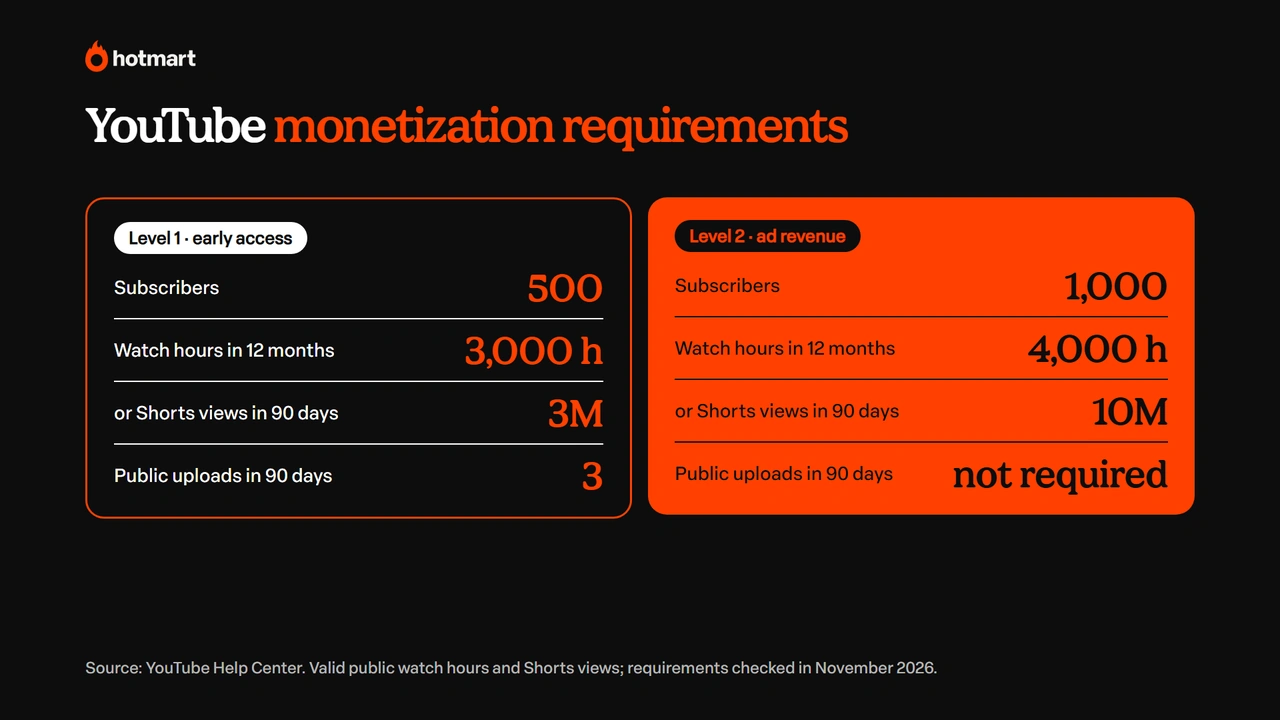
To monetize YouTube with ads, your channel needs 1,000 subscribers and 4,000 valid public watch hours in the last 12 months, or 10 million valid public Shorts views in the last 90 days. With 500 subscribers, you can already access the entry level, with features like channel memberships and Super Chat.
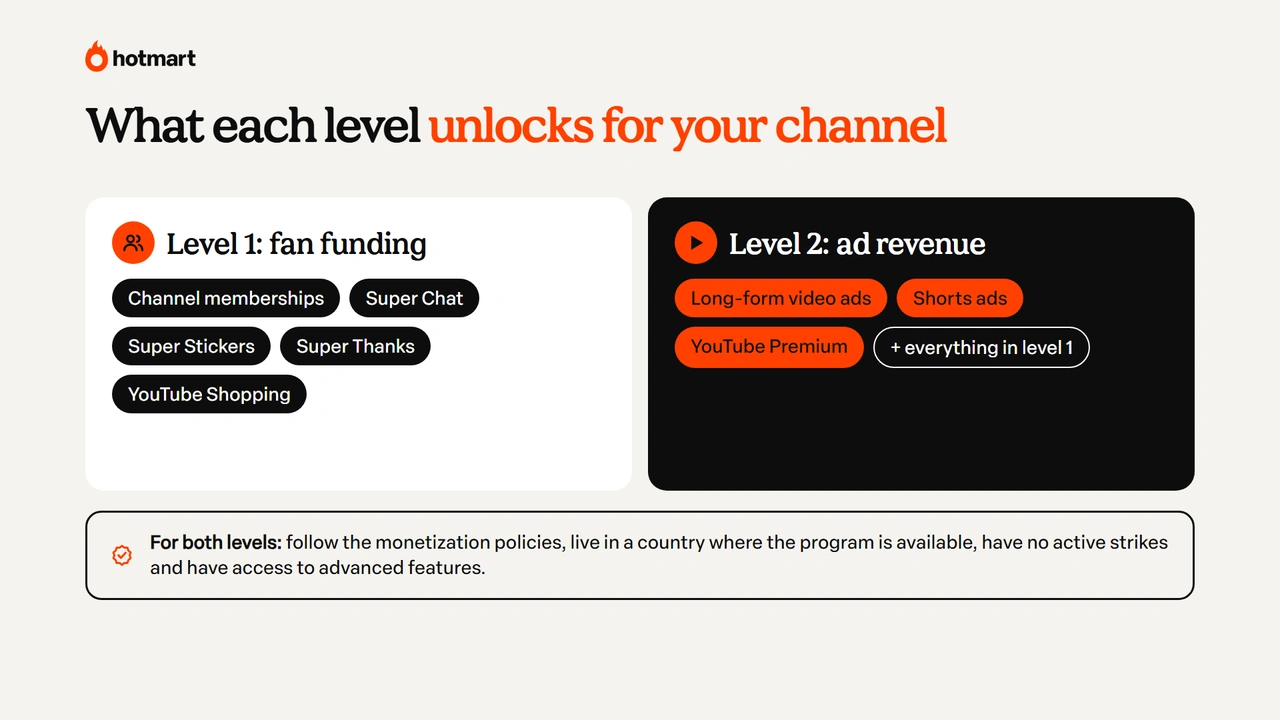
The YouTube Partner Program has two levels of access, each with different requirements and earning options. The first unlocks some fan funding and YouTube Shopping features. The second unlocks a share of ad revenue and YouTube Premium revenue.
Here are the criteria:
| Requirements | Level 1: early access | Level 2: ad revenue |
|---|---|---|
| Subscribers | 500 | 1,000 |
| Uploads | 3 valid public uploads in the last 90 days | No additional upload requirement for this level |
| Watch hours | 3,000 valid public watch hours in the last 12 months | 4,000 valid public watch hours in the last 12 months |
| Shorts alternative | 3 million valid public Shorts views in the last 90 days | 10 million valid public Shorts views in the last 90 days |
| Features unlocked | Channel memberships, Super Chat, Super Stickers, Super Thanks and YouTube Shopping features | Ad revenue from long-form videos, Shorts and YouTube Premium, plus the features available to partners |
Source: YouTube Help Center. Requirements checked in November 2026.
Beyond the numbers, your channel must follow the monetization policies, be in a country where the program is available, have no active Community Guidelines strikes and have access to YouTube’s advanced features. If you don’t have a channel yet, start by learning how to create a YouTube channel and then work toward these numbers.
2. Turn on 2-Step Verification
2-Step Verification is required to join the Partner Program and helps protect your account from unauthorized access.
To turn it on, go to your Google Account, open the Security section and look for 2-Step Verification. Then follow the instructions to set up an additional way to confirm your identity.
3. Apply in YouTube Studio
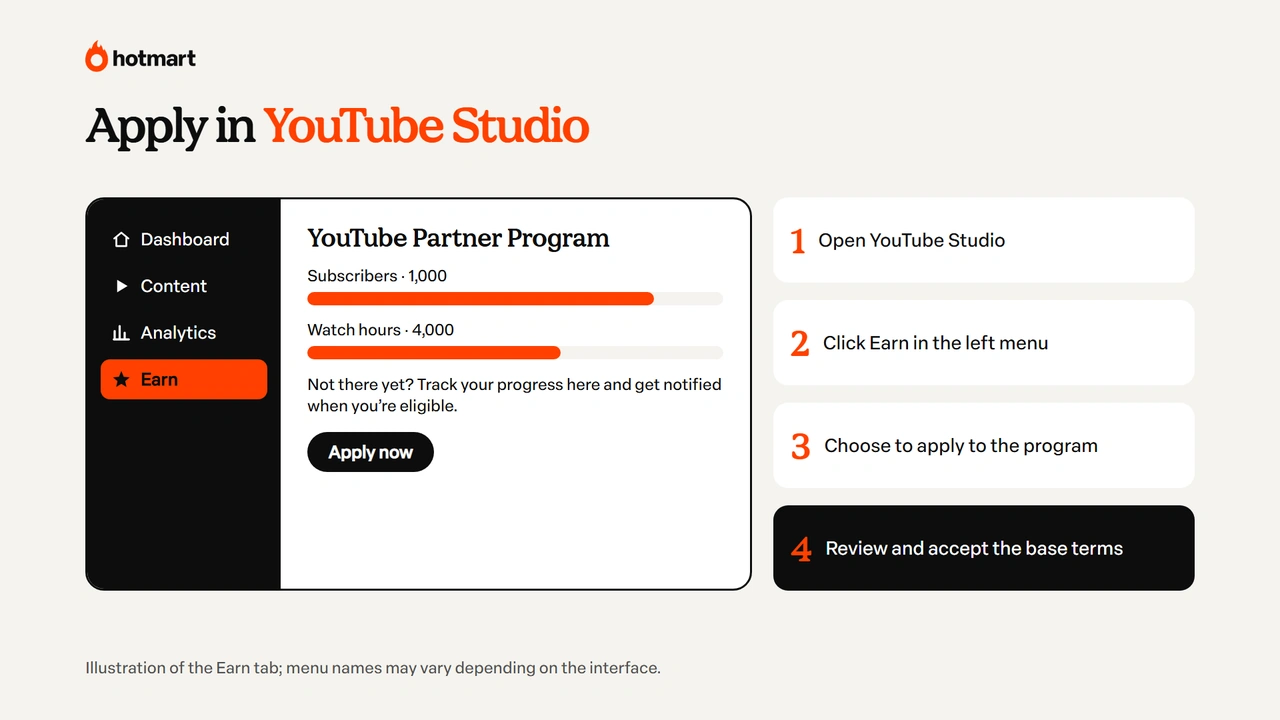
Once you meet the requirements, you can apply to the program directly in YouTube Studio.
Here’s how:
- Go to YouTube Studio.
- In the left menu, click Earn.
- Select the option to apply to the Partner Program.
- Review and accept the program’s base terms.
If you haven’t reached the requirements yet, you can track your progress in the same tab and ask to be notified when you’re eligible.
4. Link an AdSense account
AdSense for YouTube is the Google service that processes creator payments.
When you apply, YouTube Studio will ask you to link an existing account or set up a new one if you don’t have one yet.
Make sure you use accurate information and avoid duplicate accounts. If you need to create an AdSense for YouTube account, do it directly in YouTube Studio by following the platform’s instructions.
5. Wait for the channel review
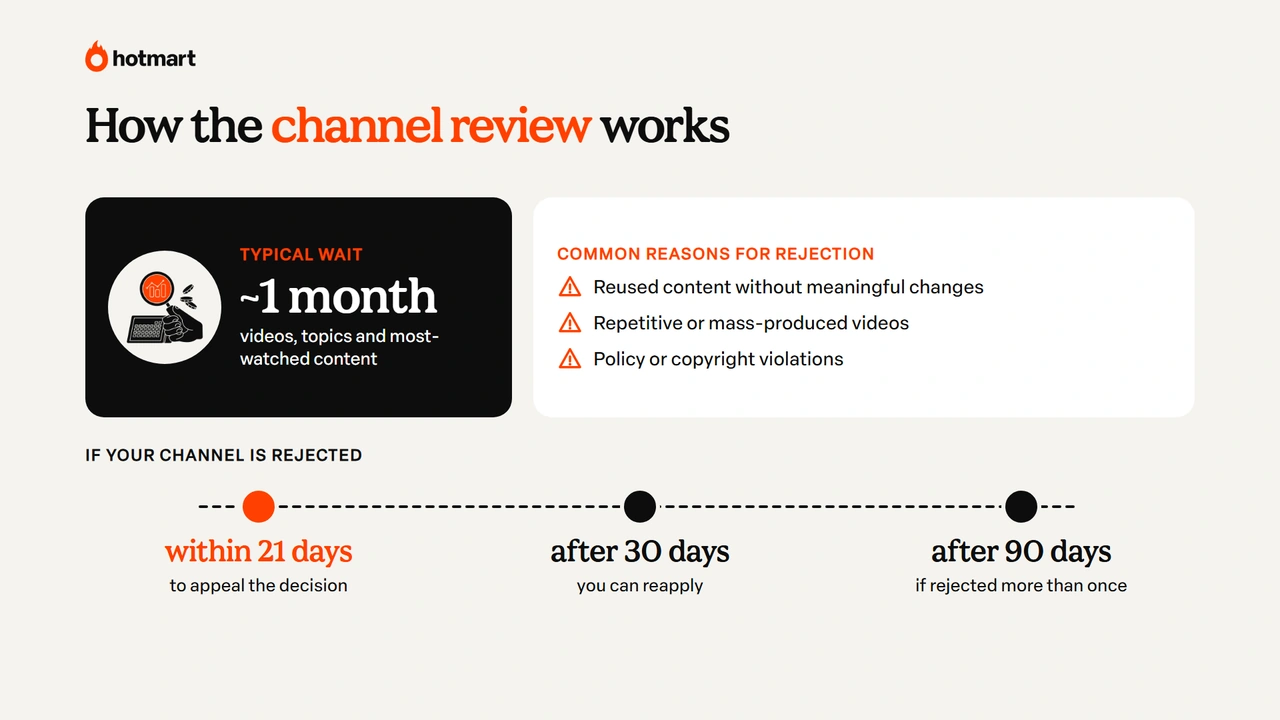
After you apply, YouTube will review your channel to check whether it follows the Partner Program policies.
This review looks at your published content, your most-watched videos, the topics you cover and other parts of your channel. It usually takes about a month, although the timing can vary.
Common reasons for rejection include:
- Reused content without meaningful changes;
- Repetitive or mass-produced videos with little originality;
- Monetization policy violations or copyright issues.
If your application is rejected, you can appeal the decision within 21 days. You can also reapply 30 days after the rejection, or 90 days after if your channel has been rejected more than once.
6. Turn on monetization modules
Once your channel is approved, the next step is to turn on the features available for your level.
In the Earn tab of YouTube Studio, you’ll find the monetization modules, such as long-form video ads, Shorts Feed ads and fan funding features.
To use each one, you need to accept its specific terms. Then you can set up the available features and track your earnings in YouTube Analytics.
This is when YouTube starts monetizing your channel: ads start running on eligible videos and estimated revenue starts adding up.
How YouTube monetization works
YouTube monetization works through revenue sharing between the platform and creators in the Partner Program. Money can come from ads, YouTube Premium subscriptions and features viewers pay for directly. According to YouTube, the platform paid more than $70 billion to creators, artists and media companies in the three years before 2024.
For long-form videos, YouTube pays creators 55% of the net revenue from ads shown on the watch page, according to the program’s rules.
These ads can run before, during or after videos. Beyond advertising, there are other ways to monetize:
- Channel memberships: viewers pay a monthly fee to access exclusive perks.
- Super Chat: viewers pay to highlight their messages during live streams and Premieres.
- Super Stickers: viewers buy animated stickers to show support during live streams.
- Super Thanks: viewers can support creators financially on eligible videos.
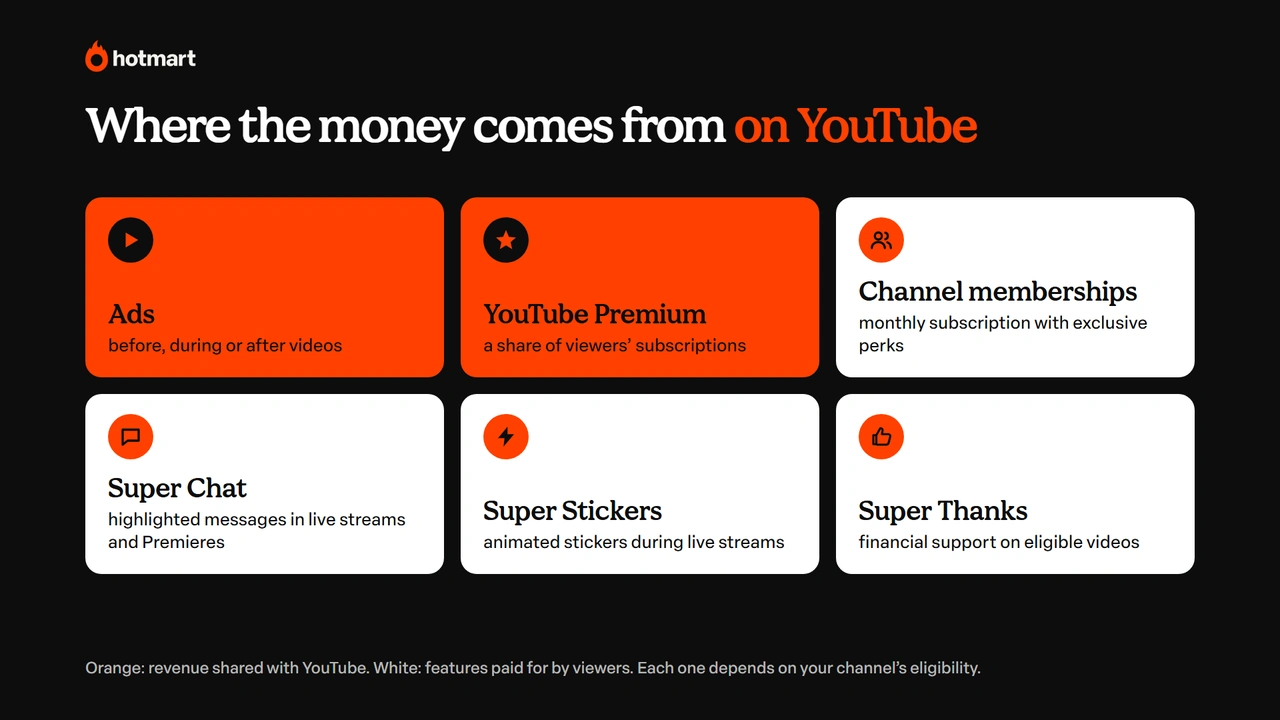
These features depend on your channel’s eligibility and on whether each feature is available in your country.
How much does YouTube pay per view?
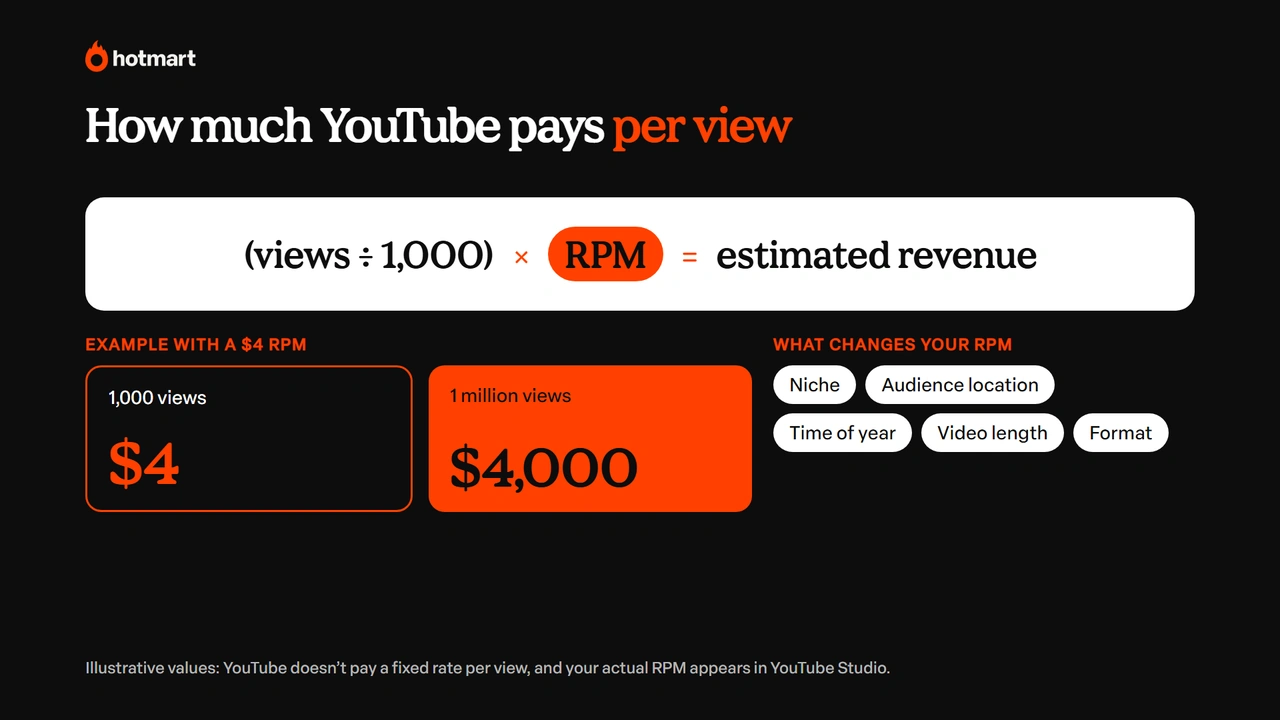
YouTube doesn’t pay a fixed amount per view. Earnings vary based on the ads shown, your channel’s niche, your audience’s location, the time of year and the content format.
To understand how much a channel earns, you need to know two metrics:
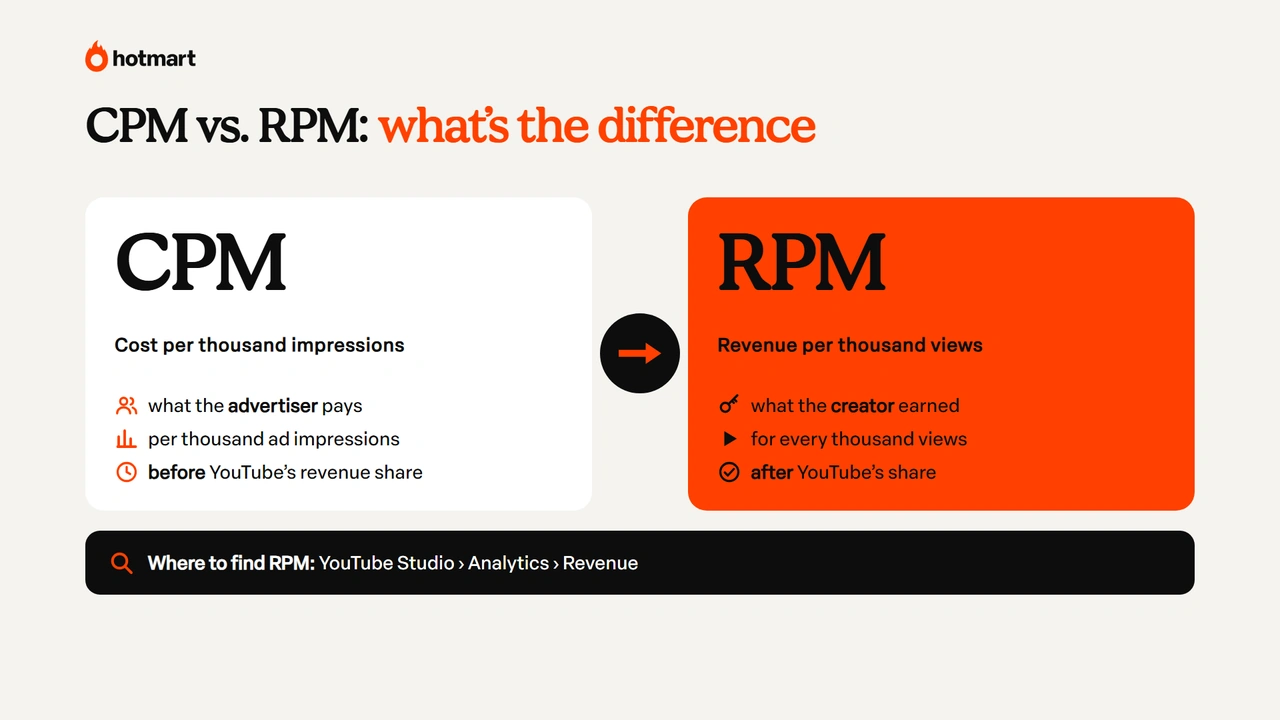
- CPM (cost per thousand impressions): how much advertisers pay for every thousand ad impressions, before YouTube’s revenue share.
- RPM (revenue per thousand views): how much the creator actually earned for every thousand views, based on the revenue included in the metric, after YouTube’s share.
RPM is especially useful for tracking your channel’s financial performance. You can find it in YouTube Studio under Analytics > Revenue.
Content about finance, technology and education, for example, can attract advertisers willing to spend more, depending on the audience. Likewise, channels with viewers in countries with larger ad markets may see different RPMs.
Video length and seasonality also affect earnings. At the end of the year, for example, higher ad spending can change how much creators earn.
So instead of looking only at view counts, it’s worth tracking your RPM and understanding which videos contribute most to your channel’s revenue.
In practice, the math is: estimated revenue = (views ÷ 1,000) × RPM. With a $4 RPM, for example, 1,000 views would earn $4 and 1 million views about $4,000. These figures are only illustrations, since RPM changes with your niche, audience, country and time of year.
How to monetize YouTube Shorts
Shorts have their own monetization model, different from the ads shown on long-form videos.
In this format, revenue from ads shown between videos in the Shorts Feed is pooled together. After applicable costs such as music licensing are covered, the amount set aside for creators is distributed based on each creator’s share of engaged views.
Creators keep 45% of the revenue allocated to them under this model.
To earn ad revenue from Shorts, you need to reach the full level of the Partner Program, with 1,000 subscribers and 10 million valid public Shorts views in the last 90 days, or meet the alternative of 4,000 valid public watch hours on long-form videos in the last 12 months.
You also need to accept the Shorts Monetization Module in YouTube Studio.
YouTube monetization rules: what can get your channel demonetized
Joining the Partner Program doesn’t guarantee your channel will stay monetized forever. YouTube keeps checking policy compliance and can limit ads, suspend features or remove monetization when there are violations.
Here are a few important precautions.
Advertiser-friendly content
Not every video on a monetized channel automatically qualifies for all ads. That’s the case for content with inappropriate language, graphic violence, sensitive topics or other elements that break the advertiser-friendly content guidelines.
When this happens, YouTube Studio may show a yellow icon, which means the video is getting limited or no ads.
Copyright and reused content
Using music, movie clips or other creators’ videos without the necessary permission can lead to copyright claims and hurt your monetization.
YouTube uses Content ID to identify protected material. Depending on the claim, a video’s revenue may go to the rights holder, or the content may face other restrictions.
That’s why you should prioritize original content and check the usage rights of any material you include in your videos.
New rules: inauthentic content and AI videos
You can monetize AI videos on YouTube, as long as the content follows the platform’s policies and offers originality and value to viewers.
In July 2025, YouTube updated its repetitious content policy, tightening the rules on mass-produced content or content with little variation. The guideline is now called the inauthentic content policy.
This means that using artificial intelligence doesn’t prevent monetization. A creator can, for example, use AI to help write scripts, edit videos or create visual elements for original content.
Since March 2024, YouTube has also required creators to disclose in YouTube Studio when a video includes realistic altered or synthetic content, such as an AI-generated voice or face that could be mistaken for something real. If you use AI to write, review your video script to make sure it reflects your own point of view.
How and when YouTube pays you
YouTube pays creators through AdSense for YouTube on a monthly cycle, as long as you’ve reached the payment threshold and there are no holds on your account.
Each month’s estimated earnings are finalized the following month and usually show up in your AdSense for YouTube balance between the 7th and the 12th. Payment is issued between the 21st and the 26th, as long as your balance has reached the payment threshold ($100 or the equivalent amount for your currency). To get paid, you need to complete the steps AdSense asks for, such as identity verification, tax information and payment method setup, as applicable.
You can track estimated earnings in YouTube Studio > Analytics > Revenue and check finalized payments in the payments section of AdSense for YouTube.
If your balance doesn’t reach the threshold, it rolls over to the next cycles.
Other ways to make money with your channel
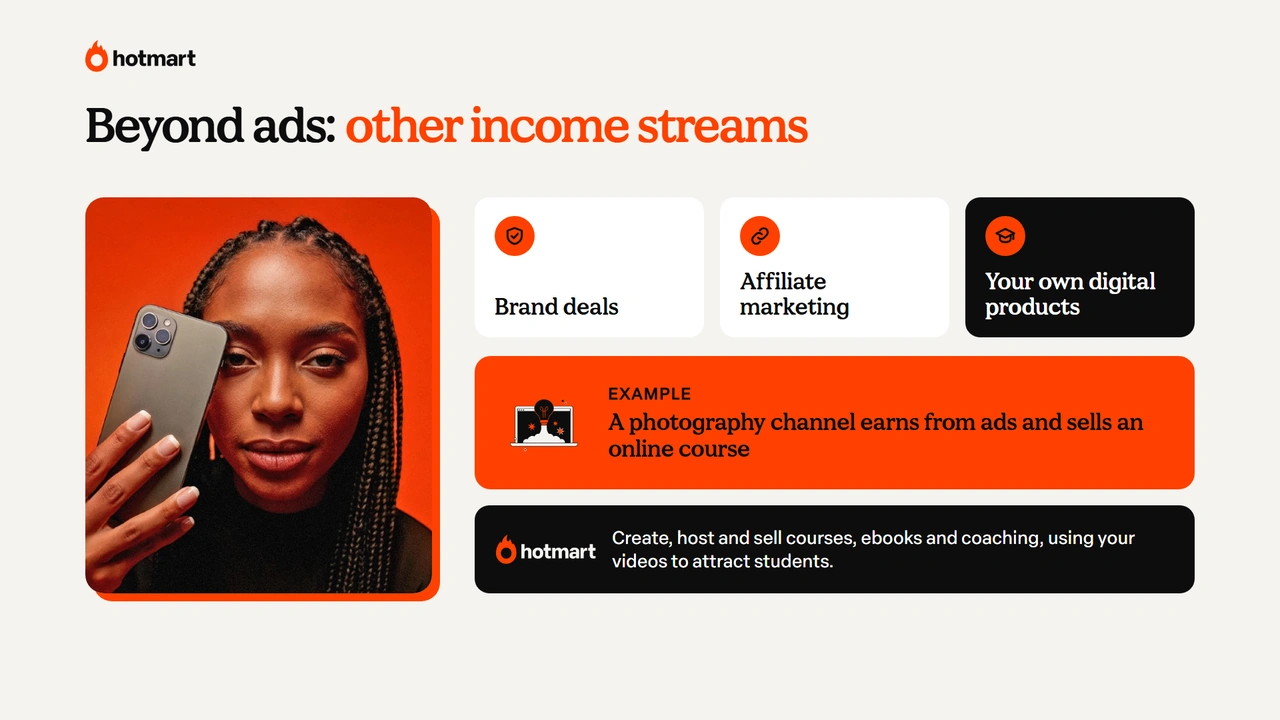
YouTube monetization doesn’t have to be your only income stream. Depending on your niche and audience, you can also make money through brand partnerships, affiliate marketing and selling your own products. See all the options in our guide on how to make money on YouTube.
Imagine a channel that teaches photography. Besides earning from ads, the creator can offer an online course for people who want to go deeper or recommend related products.
With Hotmart, you can create, host and sell digital products, such as courses, ebooks and coaching programs, using your YouTube videos to showcase your knowledge and attract interested people.
Ready to monetize your channel?
Now that you know how to monetize YouTube, the next step is to keep an eye on the Partner Program requirements and get your channel ready to apply.
As we’ve seen, the process happens in YouTube Studio, with AdSense linked and approval from the platform. After that, your earnings can vary based on RPM, the formats you publish and the monetization features you use.
It’s also important to keep your content original and follow YouTube’s policies, including when you use AI tools.
And remember: beyond the revenue the platform generates, your knowledge can open up other opportunities. With Hotmart, you can turn what you teach in your videos into digital products and grow your channel’s income.
Frequently asked questions about how to monetize YouTube
Still have questions about how to monetize YouTube? Here are answers to the most common ones.
Is it free to monetize YouTube?
Yes. Joining the YouTube Partner Program is free. To get in, you need to meet the eligibility requirements, accept the terms, link an AdSense for YouTube account and pass the platform’s review.
How can you tell if a YouTube channel is monetized?
If it’s your channel, go to YouTube Studio > Earn to check your monetization status and available features. For other people’s channels, there’s no public indicator that confirms every revenue source. Seeing ads on a video, for example, doesn’t guarantee the creator is earning from them.
Can a kids’ channel be monetized?
Yes. Channels with kids’ content can join the Partner Program as long as they meet YouTube’s requirements and policies. However, content set as "made for kids", a requirement tied to the US Children’s Online Privacy Protection Act (COPPA), has restrictions, such as no personalized ads and limits on some engagement and monetization features.
Does YouTube pay for live streams?
Yes. Eligible live streams can generate revenue from ads and features such as Super Chat, Super Stickers and channel memberships. To earn from them, you need to be in the Partner Program and meet the specific requirements for each feature.
How much does YouTube pay for 1 million views?
There’s no fixed amount, because earnings depend on your channel’s RPM. The math is: (views ÷ 1,000) × RPM. With a $4 RPM, for example, 1 million views would earn about $4,000, but the amount changes with your niche, audience, country and time of year.