Instagram trial reels: what they are, how to turn them on and how to use them to grow
Learn how Instagram trial reels show your videos to non-followers first, who can use the feature, how to turn it on and how to analyze the results to grow.

What will we see in this post

Have you ever held back from posting a video because it felt too different from what your followers are used to seeing? With Instagram trial reels, you can experiment with new ideas and find out how they perform with people who don’t know your profile yet.
In this article, we explain what the feature is, how to turn it on, which metrics to track and how to use trials to discover new formats and topics before sharing them with your audience.
Instagram trial reels at a glance:
- What it is: an Instagram feature that shows a reel to non-followers first.
- Launch: December 10, 2024.
- Who can use it: public accounts eligible for recommendations, with the minimum number of followers Instagram requires.
- Metrics: views, likes, comments and shares appear in about 24 hours.
- Automatic sharing: Instagram can show the video to your followers if it performs well in the first 72 hours.
- Limitation: collabs are not supported.
Below, we go through each of these points in detail.
What are Instagram trial reels?
Instagram trial reels are a feature of Instagram, the Meta-owned social network, that lets you publish a reel to people who don’t follow you yet before your followers see it. This way, you can see how a new audience responds to a piece of content before deciding whether to show it to your current followers.
The feature started rolling out on December 10, 2024. According to Meta’s official announcement, the goal is to give creators more freedom to experiment with new topics, formats and ways of telling stories.
How trial reels work on Instagram
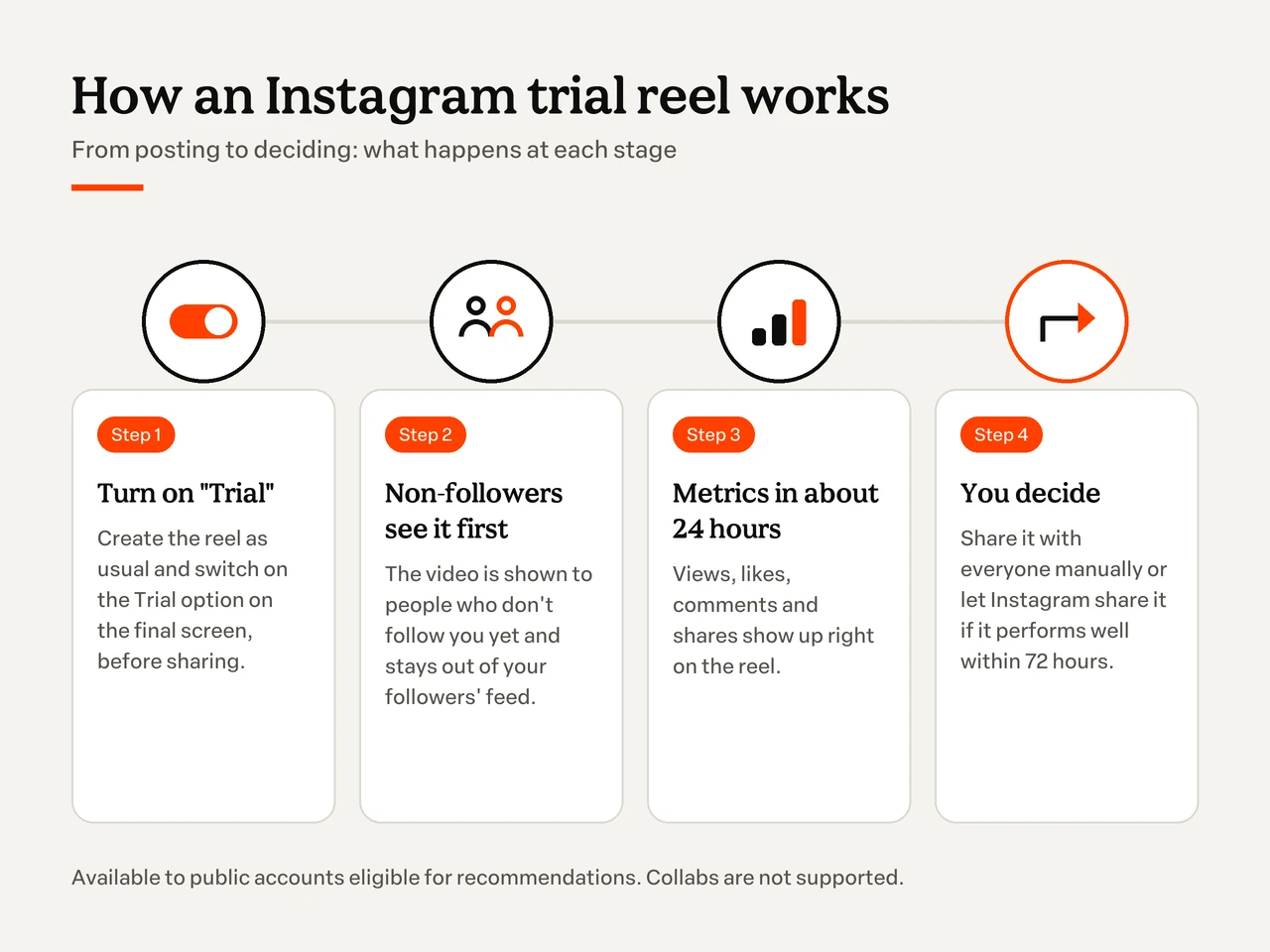
Trial reels on Instagram work like an experimental post. When you turn this option on, the video is first distributed to non-followers, so you can evaluate its performance before sharing it with your usual audience.
During this stage, the content doesn’t appear in your followers’ feed or in the public posts and reels tabs on your profile. It stays visible to you, in the same area where your drafts appear.
After about 24 hours, Instagram shows metrics such as views, likes, comments and shares. With this data, you can decide whether to share the video with everyone or keep testing other ideas.
Here are the main differences between the formats:
| Feature | Trial reels | Regular reels |
|---|---|---|
| Who sees it first? | Mostly people who don’t follow the profile. | Your followers and, later, other people Instagram recommends the video to. |
| Does it show on the profile and feed? | It doesn’t appear publicly on the profile or in followers’ feed during the trial. | It can appear on the profile and be distributed in the feed. |
| When can you analyze the metrics? | The main metrics are available after about 24 hours. | Metrics can be tracked right after posting. |
| How does the content reach followers? | By sharing it with everyone manually or turning on automatic sharing. | The content is already eligible to be shown to followers. |
Keep in mind that the feature reduces initial exposure to your current audience, but it doesn’t guarantee the video stays completely hidden from people who already follow you. Even during the trial, some followers may still see it if it’s sent by direct message or if it shows up on pages that group reels with the same audio, location or filter.
Who can use trial reels?
Trial reels are available to eligible Instagram accounts, including professional accounts of digital creators and businesses. To use the feature, the profile must be public and eligible to appear in recommendations.
The rollout was gradual. In July 2025, Instagram expanded access to the feature, but actual availability can still vary depending on each account’s characteristics and status.
Today, the rule most often cited by Instagram itself is that trial reels are available to public accounts with at least 1,000 followers that are eligible for recommendations, as Adam Mosseri confirmed, head of Instagram, in July 2025. Some scheduling tool guides mention a lower minimum of 200 followers for professional accounts (Creator or Business). Since the rollout is gradual and the criteria may change, check the Instagram Help Center and see whether the option shows up on the posting screen of a new reel.
If you still use a personal account, you can switch to a professional account in Instagram’s settings. Just look for the account type option, switch to a professional account and choose between Creator or Business. If you’re just getting started, also see how to start an Instagram account from scratch.
How to post trial reels on Instagram: step by step
Want to know how to post trial reels? The process is similar to posting a regular video. The main difference is that you need to turn on the trial option before sharing the content.
In short, to post a trial reel:
- create the reel as usual;
- turn on the “Trial” option before sharing;
- choose whether the video reaches your followers manually or automatically;
- track the metrics and decide.
Here’s each step in detail.
1. Create the reel as usual
Open Instagram, tap the create button and select Reel.
You can record a video directly in the app or choose a file from your phone’s gallery. If you prefer other tools, there are also good video recording apps.
Then make the necessary edits and add audio, text and other visual elements. It’s also worth writing a caption that introduces the topic and encourages interaction.
2. Turn on the “Trial” option before sharing
After editing the video, move on to the final posting screen.
At this stage, look for the Trial option, which appears among the sharing settings for accounts that have access to the feature.
Turn on the toggle before posting. This setting is what makes Instagram distribute the content to non-followers first.
3. Choose how the video will reach your followers
Before posting, you can define what happens after the trial stage. There are two options:
- Manual sharing: you track the results and decide when to make the video available to everyone.
- Automatic sharing: Instagram may share the reel with your followers if it performs well in the first 72 hours.
If you plan to compare different versions of a piece of content before choosing which one to publish, the manual option gives you more control over your strategy.
4. Track the metrics and decide
The trial reel stays on your profile, next to your drafts, and only you can see that it’s a trial. After posting, that’s where you follow the video and its results.
After about 24 hours, check the metrics Instagram makes available.
If the video shows promising results, you can select Share to everyone. If not, use the data to understand what you can improve in your next piece of content.
Since April 2026, you can also schedule trial reels directly on Instagram and choose when the video starts being shown to non-followers. Some social media tools, such as Metricool, also offer this option, as long as the feature is enabled on the account.
Another important limitation: you can’t add collaborators (Collab) to trial reels.
Want to improve your videos before you even post them? In the video below (in Portuguese), you’ll find tips for creating successful reels in just a few steps.
Trial reels not showing up: what to do?
If the trial reels option isn’t showing up on your Instagram, it may be because the account doesn’t meet the eligibility criteria yet or because the feature isn’t available for that profile.
Before looking for other solutions, check these points:
- Check your account type: make sure you use a professional account and meet the corresponding requirements.
- Make sure the profile is public: private accounts may not have access to the feature.
- Update the app: use a recent version of Instagram to access the available features.
- Check your Account Status: in settings, see whether the profile is eligible to appear in Instagram’s recommendations.
- Try creating a new reel: the trial option should appear on the final posting screen of a new piece of content.
- Wait and check again: even when the criteria are met, availability can vary between accounts.
Also keep in mind that there’s no separate button to request access to trial reels. When the feature is available, the option appears right in the posting flow.
And watch out: buying followers, likes or views is not a way to unlock the feature. Besides not guaranteeing access, these practices can hurt the quality of your audience and compromise the analysis of your results. If you want to reach more people faster, it’s safer to advertise on Instagram.
How to use trial reels to grow and sell on Instagram
Trial reels can work as a content lab. Instead of posting only what you already know works, you can experiment with new approaches and use the results to make more strategic decisions.
If you want to grow on Instagram or sell digital products, there are different ways to make the most of this feature:
- Test different hooks with trial reels.
- Test formats and storytelling.
- Test new topics without confusing your followers.
- Test calls to action for your product.
- Analyze your trial reels metrics.
1. Test different hooks with trial reels
The first few seconds of a reel are key to sparking curiosity and keeping people watching.
That’s why a good strategy is to test two or three different openings for the same topic and see which one gets more interest.
Imagine you create content about personal finance. For a video on how to save money, you could try:
- Question: “Do you know where your money goes at the end of the month?”
- Data: “Three small expenses may be weighing on your budget.”
- Promise: “Learn to spot the expenses that go unnoticed.”
The main content can stay similar, but the way you present it changes.
When comparing results, look at retention and watch time, when available, as well as views and interactions. This way, you start to identify which approaches spark the most interest.
Watch the video below (in Portuguese) to learn how to create reels that hold attention from start to finish.
2. Test formats and storytelling
The problem isn’t always the topic. Sometimes, the way the content is presented makes all the difference.
With trial reels, you can experiment with formats such as quick tutorials, behind the scenes, before and after, opinions on news in your niche and replies to comments. Simple homemade videos also work well for these tests.
An English teacher, for example, could compare two formats:
- Reel 1: “3 English mistakes people make at work.”
- Reel 2: “One English expression to use in your next meeting.”
Both videos cover the same subject, but they offer different experiences. The first one presents several takeaways in a row, while the second focuses on one specific tip.
By analyzing performance, the teacher can find out which approach sparks more interest among people who don’t follow her profile yet.
3. Test new topics without confusing your followers
Changing your positioning or starting to talk about a new subject can feel risky, especially when you’ve already built an audience around a specific micro-niche.
Trial reels help precisely at that moment.
Imagine a creator who makes makeup content and wants to start teaching photography techniques for beauty professionals.
Before adding the new topic to her usual schedule, she can test videos about lighting, framing and photo editing.
If the content sparks interest, the results may point to an opportunity to broaden her editorial line.
This doesn’t mean the new topic will necessarily perform the same way with current followers, but it provides information to guide the next steps.
4. Test calls to action for your product
If you sell online courses, e-books or mentoring programs, trial reels can also help you find out how to present your product in a more interesting way to new audiences.
Instead of always repeating the same sales pitch, try different approaches. It’s a practice that helps a lot when you want to promote a product online.
Imagine you have a professional baking course. You could test:
- A practical tip: teach how to price a cake and present the course as a way to go deeper.
- A real testimonial: share the experience of a student who applied what she learned in the course.
- Behind the scenes: show how the lessons were planned or how a specific technique is taught.
The goal is to find out which stories generate more interest and use those lessons when promoting the product, especially before a product launch or sales campaign.
But there’s one important caveat: testing approaches doesn’t mean experimenting with exaggerated promises or misleading information. Testimonials must be real, and commercial terms must match the actual offer.
Trial reels help you improve your communication. Your audience’s trust is still essential to building a sustainable business.
5. Analyze your trial reels metrics
A reel with lots of views may look like a success. But, depending on your goal, other metrics may matter even more.
If you want to increase profile awareness, views and reach among new audiences deserve attention.
For educational content, shares, saves and comments can help you see whether people found the information useful.
It’s also worth looking at watch time and retention, when available, to understand whether the content held people’s interest throughout the video. Instagram lets you compare the performance of trial reels with previous experiments. Use this to identify patterns instead of evaluating each post in isolation.
One more caveat: according to guidance attributed to the Instagram Help Center, videos you’ve already posted may get limited reach when reused as a trial reel. That’s why it’s better to test original content.
In the video below (in Portuguese), you’ll see what Instagram itself has said matters to the algorithm.
Are trial reels worth it?
Yes, trial reels are worth using to experiment with content and see how new audiences react before sharing it with your followers. The feature can be especially useful for creators who want to test formats, explore other topics or improve how they communicate their products.
The early results shared by Meta are also interesting. In June 2025, the company reported that 40% of the creators analyzed started posting reels more often after trying the feature. Within that group, 80% saw an increase in reach among non-followers. The data is observational and doesn’t mean every profile will get the same result.
The feature can also help you spot habits that hurt performance, such as repeating formats that don’t spark interest, using weak openings or posting content without considering your audience’s needs.
Watch the video below (in Portuguese) to discover some mistakes that may be hurting your Instagram performance.
Trial reels: how to start testing today
Now that you know how Instagram trial reels work, why not experiment with a different idea?
As we’ve seen, the feature lets you show a video first to people who don’t follow your profile yet. After about 24 hours, you can analyze the first results and decide whether to share the content with your audience.
Use this opportunity to test new hooks, formats, topics and ways of presenting your products.
Remember that the goal isn’t to get every post right, but to learn from each experiment and use the results to improve your strategy.
And if you already share your knowledge on social media, what you learn can also open up opportunities to turn your content into a business. When your tests show which topics and formats attract new people, you already have clues about what to turn into one of the digital products you can sell.
With Hotmart, you can create, host and sell online courses, e-books, mentoring programs and other digital products, connecting your knowledge with people who want to learn from you.
Frequently asked questions about Instagram trial reels
Still have questions? Below, we answer some of the most frequently asked questions about Instagram trial reels.
Do trial reels help you gain followers?
Trial reels can help you reach people who don't follow your profile yet, increasing your chances of being discovered. However, the feature doesn't guarantee new followers. Results depend on how relevant the content is, the audience's interest and other factors that affect how videos are distributed.
How long should you wait to analyze a trial reel?
Instagram makes the main metrics of a trial reel available after about 24 hours. If you turn on automatic sharing, the platform may evaluate performance during the first 72 hours to decide whether to show the content to your followers. It's worth tracking the results throughout this period before drawing conclusions.
Can you collab on a trial reel?
No. Currently, trial reels don't let you add collaborators through the Collab feature. If you want to post a video together with another profile, use a regular reel.
How many trial reels can you post per day?
Instagram doesn't disclose an official daily limit for trial reels. In 2025, some creators received notices saying they were close to a daily limit, which shows the platform is testing a cap. In practice, it's better to prioritize a few well-planned tests instead of posting many similar videos.